
Cloud Storage and Data Management Education is the quiet discipline that prevents “data” from becoming a swamp. The diagram makes the logic visible: learning begins with inputs—examples, exercises, and what the learner already knows—but it cannot proceed safely without controls. Storage standards and data governance act like guardrails: they insist on clarity about ownership, access, retention, privacy, and the difference between convenience and responsibility. With mechanisms such as guided instruction and hands-on labs, students practice the decisions that matter: when to use object storage versus file storage, how to structure naming and metadata so retrieval is sane, how to apply permissions without accidentally locking everyone out or letting everyone in, and how lifecycle rules quietly keep costs and risk from creeping upward. The output is not merely “knowing the services,” but knowing how to keep data usable over time—findable, protected, compliant, and ready for analysis, backup, or recovery when the real world becomes messy.
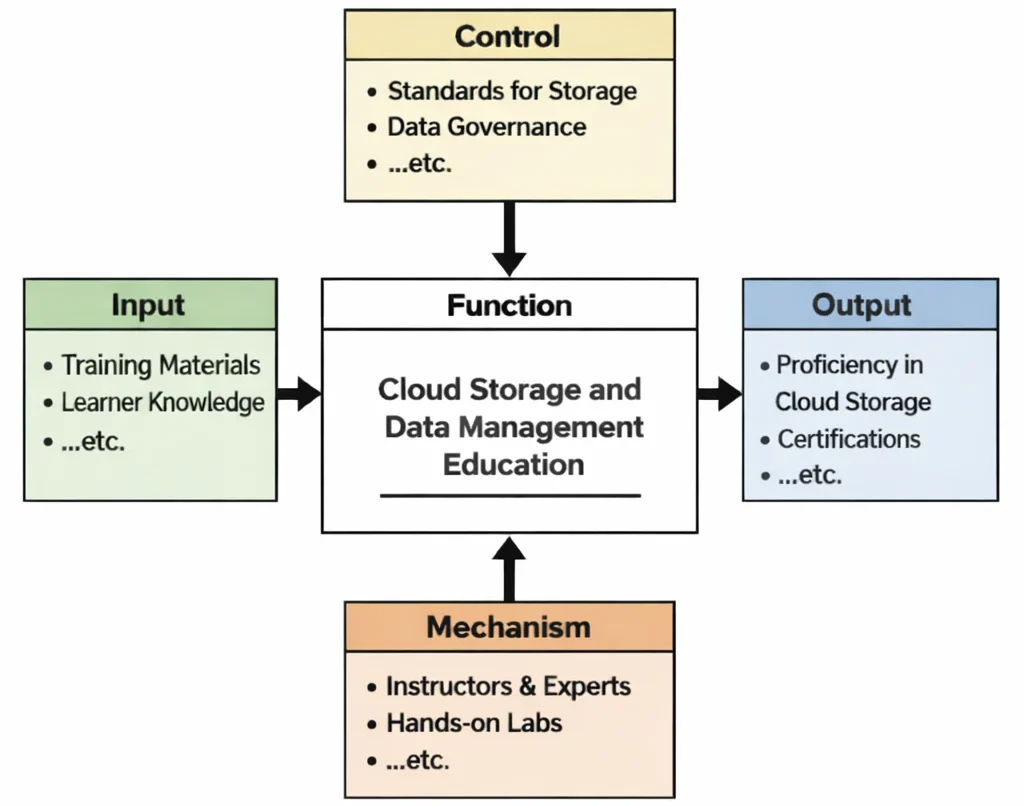
This IDEF0 (Input–Control–Output–Mechanism) diagram summarizes Cloud Storage and Data Management Education as a structured transformation. Inputs such as training materials and prior learner knowledge enter the central learning function. Controls—storage standards, data governance rules, and related requirements—shape the content and define acceptable practices. Mechanisms such as instructors, experts, and hands-on labs provide the environment for practice and feedback. Outputs include practical proficiency in cloud storage and data management, along with demonstrable skills such as organizing data, choosing storage types, applying access controls, managing lifecycle policies, and supporting compliance-driven workflows.
Cloud storage and data management are fundamental components of the modern digital infrastructure that support a wide range of services across STEM fields. In the context of cloud computing, effective data management ensures that information is stored, accessed, and secured in ways that align with performance and regulatory needs. The rapid growth of data-driven applications, from information technology systems to emerging technologies, demands reliable and scalable solutions for handling massive volumes of data.
Students exploring cloud service models learn how different architectures—like IaaS, PaaS, and SaaS—require tailored storage strategies. For example, object storage is often used in scalable SaaS platforms, while block storage supports virtual machines in IaaS. Understanding how these options align with cloud deployment models is crucial for optimizing cost, speed, and access control in both public and private cloud environments.
A well-designed cloud storage system integrates seamlessly with DevOps, CI/CD, and infrastructure as code pipelines to automate storage provisioning and ensure consistency across development environments. Moreover, with the expansion of edge computing, data is increasingly processed closer to where it is generated—necessitating decentralized storage architectures and localized data caching strategies.
Maintaining high availability and rapid access to data requires a strong grasp of networking and connectivity in the cloud. Performance tuning and intelligent caching, along with scalability planning, are essential to meet the demands of real-time applications. As cloud systems scale, so too must the data architectures that underpin them.
Equally important is the integration of cybersecurity measures to protect sensitive data. Strong data governance includes not only robust security, compliance, and identity management protocols but also discipline-specific practices like cloud security and cryptographic safeguards. These are supported by emerging solutions such as AI and ML in cybersecurity to detect anomalies and reinforce data protection.
Students and professionals must also be aware of organizational and regulatory factors. Cybersecurity policies, awareness training, and sector-specific compliance, such as CPS security, play a pivotal role in maintaining trust and legal compliance. Tools such as application security frameworks ensure that the data lifecycle—from storage to deletion—is managed securely and efficiently.
As organizations move toward virtualized and containerized environments, they rely on cloud storage systems that can support dynamic workloads and distributed applications. Innovations like serverless computing are also shifting how and when data is stored, accessed, and processed. At the intersection of internet technologies and cloud services lies a rapidly evolving field where data agility is a competitive advantage.
Understanding cloud storage and data management is foundational for students entering fields related to artificial intelligence and machine learning. Whether in STEM research, enterprise systems, or mobile applications, mastering how data is structured, protected, and leveraged at scale enables students to build resilient and innovative solutions in a data-driven world.

This image visualizes cloud storage as an interconnected system. A bright central cloud with an upload symbol represents data entering or moving through the cloud, while surrounding callouts highlight core services such as object storage and block storage, alongside reliability tools like snapshots, data backup, and disaster recovery. Database icons, server blocks, and orbit-like rings suggest how modern data management combines storage types, protection strategies, and recovery planning to keep information secure, available, and scalable.
Building Cloud Systems: Data Storage Navigation
Discover how cloud storage and data management underpin data persistence, durability guarantees, and storage abstraction across the Cloud Computing cluster. Each card details specific data formats, I/O access patterns, and storage lifecycle workflows.
Cloud Systems Overview
Presents the overall architectural macro-view, detailing how physical SAN/NAS storage arrays and distributed cloud storage nodes provide underlying data durability.
Layers of Cloud Services
Examines raw virtual block storage in IaaS, managed relational database platforms in PaaS, and distributed cloud file drives in SaaS environments.
Deployment Strategies
Explores data placement policies, managing on-premise local SAN arrays in private clouds versus globally replicated object buckets in public cloud regions.
Data in Distributed Systems
Focuses on object storage (S3/Blob), low-latency block storage (EBS), network file systems (NFS/SMB), database replication, lifecycle archiving, and disaster recovery snapshots.
Resource Abstraction
Covers persistent volume claims (PVC) in Kubernetes, container storage interfaces (CSI), and virtual disk image file formats (.qcow2, .vmdk).
Automated Delivery Systems
Details automated database schema migrations, state file storage in Terraform (S3 backends with locking), and automated snapshot testing pipelines.
Cloud Connectivity
Focuses on private VPC storage endpoints, S3 bucket network policies, Direct Connect storage transfers, and encrypted storage transit routes.
Scaling & Reliability
Analyzes read-replica database scaling, storage IOPS provisioning, multi-region object replication, and cross-region disaster recovery failover speed.
Trust & Governance
Enforces customer-managed encryption keys (KMS), server-side encryption at rest (AES-256), immutable WORM storage locks, and audit logging access rules.
Serverless Execution
Details event-driven storage triggers, executing serverless FaaS functions automatically upon new object upload events into cloud storage buckets.
Edge & Distributed Futures
Examines localized edge caching, high-performance NVMe storage gateways, and sync architectures transmitting sensor telemetry to central cloud data lakes.
Core Cloud Storage Architectures & Workflows
Modern cloud data management relies on specialized storage abstractions optimized for distinct I/O access patterns, scale, and performance needs:
- Object Storage: Highly scalable flat address space architecture where data is stored as discrete objects containing raw data, customizable metadata tags, and a globally unique URI identifier.
- Key Capabilities: Virtually infinite HTTP REST scale, built-in multi-AZ redundancy, and cost-effective lifecycle archiving rules.
- Primary Use Cases: Media asset hosting, static website files, massive data lakes, and continuous backup archives.
- Examples: Amazon S3, Google Cloud Storage, Azure Blob Storage.
- Block Storage: High-speed raw storage that splits data into fixed-size unformatted blocks managed directly by operating system filesystems.
- Key Capabilities: Ultra-low single-digit millisecond latency, high Input/Output Operations Per Second (IOPS), and direct virtual machine mounting.
- Primary Use Cases: Relational database transaction logs, virtual machine boot volumes, and enterprise ERP runtimes.
- Examples: Amazon EBS, Azure Persistent Disks, Google Persistent Disk.
- File Storage: Shared hierarchical file system organizing data into traditional folder trees accessible simultaneously by multiple virtual servers via standard network protocols (NFS, SMB).
- Key Capabilities: Shared multi-instance read/write file locks and native integration with legacy enterprise software.
- Primary Use Cases: Centralized user home directories, corporate content repositories, and shared web application media drives.
- Examples: Amazon EFS / FSx, Azure Files, Google Cloud Filestore.
- Data Backup, Snapshots & Managed Databases:
- Snapshots & Point-in-Time Recovery (PITR): Differential block-level backups that record exact storage state changes over time for rapid disaster recovery.
- Managed Database Services: Relational DBaaS (Amazon RDS, Cloud SQL) and NoSQL engines (DynamoDB, MongoDB Atlas, Cosmos DB) providing automated sharding, indexing, replication, and failover.
- Big Data Warehouses: Hyperscale analytical data stores (Google BigQuery, AWS Redshift, Snowflake) handling petabyte-scale SQL queries for real-time analytics.
Why Study Cloud Storage and Data Management
Mastering cloud storage architecture equips engineers to build reliable, high-throughput, and cost-optimized data ecosystems:
- Data-Centric Engineering: Teaches developers how to select the precise storage format (Block vs. Object vs. File) matching workload I/O performance and latency targets.
- Lifecycle & Cost Governance: Enables organizations to implement automated tiering rules (Hot → Cool → Cold Archive) that drastically reduce storage overheads.
- Compliance & Resilience Mastery: Prepares technical teams to configure zero-data-loss replication, snapshot automation, customer-managed cryptographic keys, and GDPR-compliant lifecycle retention.
Engineering FAQs: Cloud Storage & Data Management
What is cloud storage, and how does it function?
Cloud storage delivers on-demand digital data storage capacity over the internet. Providers maintain massive distributed data centers, replicating user data across multiple physical disks and availability zones to guarantee durability and high availability.
What is the functional difference between Object Storage and Block Storage?
Object storage stores data as unstructured objects with unique HTTP URLs and custom metadata tags, optimized for massive web scale. Block storage provides raw unformatted storage blocks attached directly to a virtual machine host, optimized for low-latency database disk I/O.
How do storage lifecycle management policies save money?
Lifecycle rules automatically transition objects from high-cost, high-performance “Hot” tiers to low-cost “Cool” or “Cold Archive” tiers (e.g., AWS S3 Glacier) based on age or access frequency, cutting long-term storage costs by up to 90%.
What is the role of Server-Side Encryption (SSE) in cloud storage?
SSE automatically encrypts data blocks before writing them to physical disk platters (using algorithms like AES-256) and decrypts them when read by authorized users, protecting physical disks from unauthorized extraction.
How does data replication support high availability and disaster recovery?
Cloud storage replicates data synchronously or asynchronously across multiple physical Availability Zones (AZs) or geographic regions. If an entire data center experiences a failure, applications instantly access redundant data copies from an active standby location.
Interactive Review & Problem Solving
Review Questions & Answers
1. What is cloud storage and how does it function within modern IT infrastructures?
Answer: Cloud storage delivers remote data storage capacity over network APIs or storage protocols. It functions using distributed storage clusters that replicate data across multiple physical disks and data centers, abstracting physical drive management away from the consumer.
2. What are the primary types of cloud storage services available today?
Answer: The three primary types are Object Storage (unstructured files with HTTP metadata), Block Storage (high-performance virtual disks mounted to VMs), and File Storage (shared hierarchical folder drives over NFS/SMB).
3. How does cloud storage enhance data security and reliability compared to traditional storage?
Answer: Cloud storage provides automated 99.999999999% (11 9s) durability guarantees through multi-AZ replication, server-side AES-256 encryption, granular IAM permissions, immutable snapshot backups, and continuous disk health monitoring.
4. What role does data redundancy play in cloud storage systems?
Answer: Redundancy distributes duplicate copies of data across independent power grids and hardware nodes. This prevents single-point-of-failure data loss and maintains uninterrupted read access during physical disk or rack failures.
5. How do cloud storage solutions support scalability and cost efficiency for growing businesses?
Answer: Cloud storage offers pay-as-you-go elastic provisioning. Organizations scale capacity instantly from gigabytes to petabytes without purchasing physical SAN hardware, while automated lifecycle tiering moves stale data to cheaper archive tiers.
6. What are the key considerations for choosing a cloud storage provider?
Answer: Key considerations include data transfer egress rates, IOPS/throughput performance SLAs, regulatory data residency compliance, KMS encryption key management options, API integration support, and long-term storage tier pricing.
7. How does cloud storage facilitate disaster recovery and business continuity?
Answer: By maintaining automated point-in-time snapshot schedules and cross-region geo-replication, allowing IT teams to restore full database states or failover application traffic to secondary cloud regions in minutes.
8. In what ways does cloud storage contribute to collaboration and remote work?
Answer: Shared cloud file storage and object repositories provide global HTTP API access, file locking, automated version history tracking, and secure web access controls for distributed remote teams.
9. What challenges might organizations face when migrating to cloud storage, and how can they be addressed?
Answer: Challenges include massive network transfer times (bandwidth bottlenecks), application code changes for S3 APIs, and access control re-mapping. Solutions include physical storage appliance migration tools (AWS Snowball) and hybrid storage gateways.
10. How do evolving technologies and trends impact the future of cloud storage solutions?
Answer: Trends like AI-driven storage tiering, NVMe-over-Fabrics edge caching, quantum-resistant encryption, and serverless object processing are making storage architectures faster, more automated, and infinitely scalable.
Thought-Provoking Architectural Questions
1. How can advancements in AI transform data management strategies within cloud storage environments?
Answer: AI machine learning models analyze data access telemetry in real time, automatically predicting when files can be safely transitioned to cold archive tiers, auto-generating semantic metadata tags, and detecting malicious data exfiltration patterns.
2. What are the potential risks and benefits of integrating blockchain technology with cloud storage solutions?
Answer: Benefits include decentralized cryptographic data verification and tamper-proof auditing logs. Risks include increased transaction latency, complex smart contract management, and higher compute overheads.
3. In what ways can cloud storage solutions be optimized to reduce energy consumption and support sustainable IT?
Answer: Through aggressive data deduplication, high-density cold tape archives (which consume zero idle power), hardware virtualization, and moving workloads to cloud regions powered by 100% renewable energy.
4. How might edge computing reshape the traditional cloud storage paradigm in terms of latency?
Answer: Edge storage places high-speed NVMe caches near data sources (IoT devices/PoPs), processing real-time writes locally in sub-5ms while asynchronously syncing aggregated telemetry back to central cloud object stores.
5. What impact do regulatory compliance and data sovereignty issues have on cloud storage architectures?
Answer: Data sovereignty mandates require cloud storage buckets to be pinned strictly to physical geographical regions (e.g., EU-only regions for GDPR), blocking un-encrypted cross-border data replication.
6. How can organizations effectively measure the ROI of investing in advanced cloud storage technologies?
Answer: By quantifying reductions in cost-per-gigabyte stored, total cost of ownership (TCO) savings from hardware retirement, recovery time objective (RTO) speedups, and labor hours saved on disk array maintenance.
7. What future trends in data storage technologies could alter the cloud storage landscape?
Answer: Non-Volatile Memory Express (NVMe over Fabrics), DNA-based ultra-dense archival storage, optical glass storage, and quantum-safe cryptographic storage systems.
8. How can cloud storage providers ensure a balance between performance, cost, and security?
Answer: By engineering multi-tiered storage classes (Standard, Infrequent Access, Glacier Archive), enforcing hardware KMS encryption by default, and using intelligent automated tiering algorithms.
9. How might advancements in data compression and deduplication impact cloud storage efficiency?
Answer: High-ratio block deduplication and Zstandard compression eliminate duplicate file blocks across multi-tenant servers, reducing physical disk utilization and network backup payload sizes by up to 60–80%.
10. What strategies can organizations implement to mitigate cloud storage data breach risks?
Answer: Disabling public bucket access by default, enforcing MFA delete policies, deploying automated DLP (Data Loss Prevention) scanners, and enforcing client-side key encryption.
11. How can integrating cloud storage with digital transformation initiatives drive business growth?
Answer: Centralized object data lakes enable real-time big data queries and machine learning model training, converting raw operational logs into actionable business insights instantly.
12. What long-term economic and operational impacts result from adopting advanced cloud storage?
Answer: Shifts hardware CapEx to flexible OpEx, lowers facility footprints, provides near-infinite scaling for enterprise applications, and builds near-zero RTO disaster recovery readiness.
Numerical Engineering Problems & Solutions
Problem 1: Calculating Monthly Cloud Storage Cost
An enterprise stores 50 TB of unstructured media data (50,000 GB) in an object storage bucket. The cloud provider charges $0.03 per GB per month for standard storage. Calculate the total monthly storage cost and total annual expense.
An enterprise stores 50 TB of unstructured media data (50,000 GB) in an object storage bucket. The cloud provider charges $0.03 per GB per month for standard storage. Calculate the total monthly storage cost and total annual expense.
Solution:
- Convert 50 TB to Gigabytes: 50 × 1,000 GB = 50,000 GB
- Monthly cost = 50,000 GB × $0.03/GB = $1,500/month
- Annual cost = $1,500 × 12 months = $18,000/year
Problem 2: Estimating Annual Savings from Migrating to Cloud Storage
An organization manages 30 TB (30,000 GB) of data. On-premise SAN disk storage costs $0.10 per GB per month in maintenance and power, while cloud object storage costs $0.03 per GB per month. Calculate monthly savings and annual savings.
An organization manages 30 TB (30,000 GB) of data. On-premise SAN disk storage costs $0.10 per GB per month in maintenance and power, while cloud object storage costs $0.03 per GB per month. Calculate monthly savings and annual savings.
Solution:
- Monthly storage cost difference per GB = $0.10 – $0.03 = $0.07/GB saved
- Monthly cost savings = 30,000 GB × $0.07 = $2,100/month
- Annual savings = $2,100 × 12 months = $25,200/year
Problem 3: Determining Cost Per File Stored in the Cloud
A cloud storage bucket hosts 400,000 document files, incurring a total monthly bucket storage invoice of $1,200. Calculate the exact monthly storage cost per individual file.
A cloud storage bucket hosts 400,000 document files, incurring a total monthly bucket storage invoice of $1,200. Calculate the exact monthly storage cost per individual file.
Solution:
- Cost per file per month = Total Monthly Invoice / Total Files = $1,200 / 400,000 = $0.003 per file
Problem 4: Calculating Data Redundancy Storage Overhead
A high-durability cloud storage class uses a redundancy factor of 3 (storing 3 identical physical copies across availability zones). For a raw dataset of 20 TB, calculate the total raw physical storage capacity required and the total storage cost if raw capacity is billed at $50 per TB per month.
A high-durability cloud storage class uses a redundancy factor of 3 (storing 3 identical physical copies across availability zones). For a raw dataset of 20 TB, calculate the total raw physical storage capacity required and the total storage cost if raw capacity is billed at $50 per TB per month.
Solution:
- Effective raw physical storage required = 20 TB × 3 copies = 60 TB
- Total physical storage cost = 60 TB × $50/TB = $3,000/month
Problem 5: Estimating Data Transfer Cost for Cloud Storage Backup
A backup pipeline transfers 8 TB of data (8,192 GB) into cloud storage per month. Data ingress network transfer costs $0.05 per GB. Calculate the monthly backup data transfer cost and annual transfer expense.
A backup pipeline transfers 8 TB of data (8,192 GB) into cloud storage per month. Data ingress network transfer costs $0.05 per GB. Calculate the monthly backup data transfer cost and annual transfer expense.
Solution:
- Convert 8 TB to GB: 8 × 1,024 GB = 8,192 GB
- Monthly transfer cost = 8,192 GB × $0.05/GB = $409.60
- Annual transfer cost = $409.60 × 12 months = $4,915.20
Problem 6: Computing Latency Improvement Percentage
An un-cached database query takes 180 ms to fetch data from remote disk storage. Implementing a Redis in-memory cache layer lowers average data retrieval latency to 120 ms. Calculate absolute latency reduction and percentage speedup.
An un-cached database query takes 180 ms to fetch data from remote disk storage. Implementing a Redis in-memory cache layer lowers average data retrieval latency to 120 ms. Calculate absolute latency reduction and percentage speedup.
Solution:
- Latency reduction = 180 ms – 120 ms = 60 ms saved
- Percentage speedup = (60 ms / 180 ms) × 100 = 33.33%
Problem 7: Calculating Storage Cost with a Volume Discount
An enterprise stores 100 TB (100,000 GB) of object data. The baseline storage rate is $0.04 per GB per month. The provider offers a 20% volume tier discount for capacity exceeding 50 TB. Calculate the final discounted monthly storage invoice.
An enterprise stores 100 TB (100,000 GB) of object data. The baseline storage rate is $0.04 per GB per month. The provider offers a 20% volume tier discount for capacity exceeding 50 TB. Calculate the final discounted monthly storage invoice.
Solution:
- Initial baseline cost = 100,000 GB × $0.04/GB = $4,000
- Discounted rate multiplier = 1 – 0.20 = 0.80
- Final monthly storage cost = $4,000 × 0.80 = $3,200
Problem 8: Determining the ROI of a Cloud Storage Migration Project
An enterprise spends $150,000 in upfront migration costs to transition legacy tape archives to cloud object storage. The cloud setup generates $50,000 in annual operational savings. Calculate the payback period in years and the 5-year ROI percentage.
An enterprise spends $150,000 in upfront migration costs to transition legacy tape archives to cloud object storage. The cloud setup generates $50,000 in annual operational savings. Calculate the payback period in years and the 5-year ROI percentage.
Solution:
- Payback period = $150,000 / $50,000 = 3.0 years
- Total 5-year cumulative savings = $50,000 × 5 = $250,000
- Net financial gain = $250,000 – $150,000 = $100,000
- 5-Year ROI = ($100,000 / $150,000) × 100 = 66.67%
Problem 9: Computing the Cost Per TB for Cloud Storage
An organization receives a monthly cloud storage invoice of $10,000 for storing 200 TB of raw data. Calculate effective monthly cost per TB and total annual cost per TB.
An organization receives a monthly cloud storage invoice of $10,000 for storing 200 TB of raw data. Calculate effective monthly cost per TB and total annual cost per TB.
Solution:
- Monthly cost per TB = $10,000 / 200 TB = $50 per TB per month
- Annual cost per TB = $50 × 12 months = $600 per TB per year
Problem 10: Calculating the Effect of Data Compression on Storage Costs
An application generates 40 TB of raw log files. Enabling Zstandard data compression reduces the storage footprint by 50% to 20 TB. If cloud storage costs $75 per TB per month, calculate raw cost, compressed cost, and monthly savings.
An application generates 40 TB of raw log files. Enabling Zstandard data compression reduces the storage footprint by 50% to 20 TB. If cloud storage costs $75 per TB per month, calculate raw cost, compressed cost, and monthly savings.
Solution:
- Raw uncompressed storage cost = 40 TB × $75 = $3,000/month
- Compressed storage cost = 20 TB × $75 = $1,500/month
- Monthly savings = $3,000 – $1,500 = $1,500/month (50% reduction)
Problem 11: Determining Average Cost per User for Cloud Storage Subscription
An enterprise cloud file drive workspace costs $8,000 per month and supports 2,000 active employee users. Calculate the monthly cost per user and total annual cost per user.
An enterprise cloud file drive workspace costs $8,000 per month and supports 2,000 active employee users. Calculate the monthly cost per user and total annual cost per user.
Solution:
- Monthly cost per user = $8,000 / 2,000 users = $4 per user per month
- Annual cost per user = $4 × 12 months = $48 per user per year
Problem 12: Break-Even Analysis for Cloud Storage Investment
An automated cloud archival project requires an initial setup cost of $200,000 and generates $20,000 per month in operational tape storage savings. Calculate the break-even payback period in months and total net savings over a 3-year period (36 months).
An automated cloud archival project requires an initial setup cost of $200,000 and generates $20,000 per month in operational tape storage savings. Calculate the break-even payback period in months and total net savings over a 3-year period (36 months).
Solution:
- Break-even payback period = Initial Investment / Monthly Savings = $200,000 / $20,000 = 10 months
- Total 36-month gross savings = 36 months × $20,000 = $720,000
- Net savings after payback = $720,000 – $200,000 = $520,000
Cloud Storage — Summary & Wrap-Up
Cloud storage has revolutionized the way individuals and organizations manage, access, and share data, providing scalable, secure, and cost-effective solutions for growing digital demands. By eliminating the constraints of physical storage and enabling real-time access from anywhere, cloud storage supports seamless collaboration, disaster recovery, and data-driven innovation. As advancements in encryption, redundancy, and AI-driven management enhance its reliability and efficiency, cloud storage continues to empower businesses and individuals to harness the full potential of their data. With its integral role in the broader landscape of cloud computing, cloud storage remains a cornerstone technology driving progress in the digital age.