Prepare for University Studies & Career Advancement

Cloud Service Models

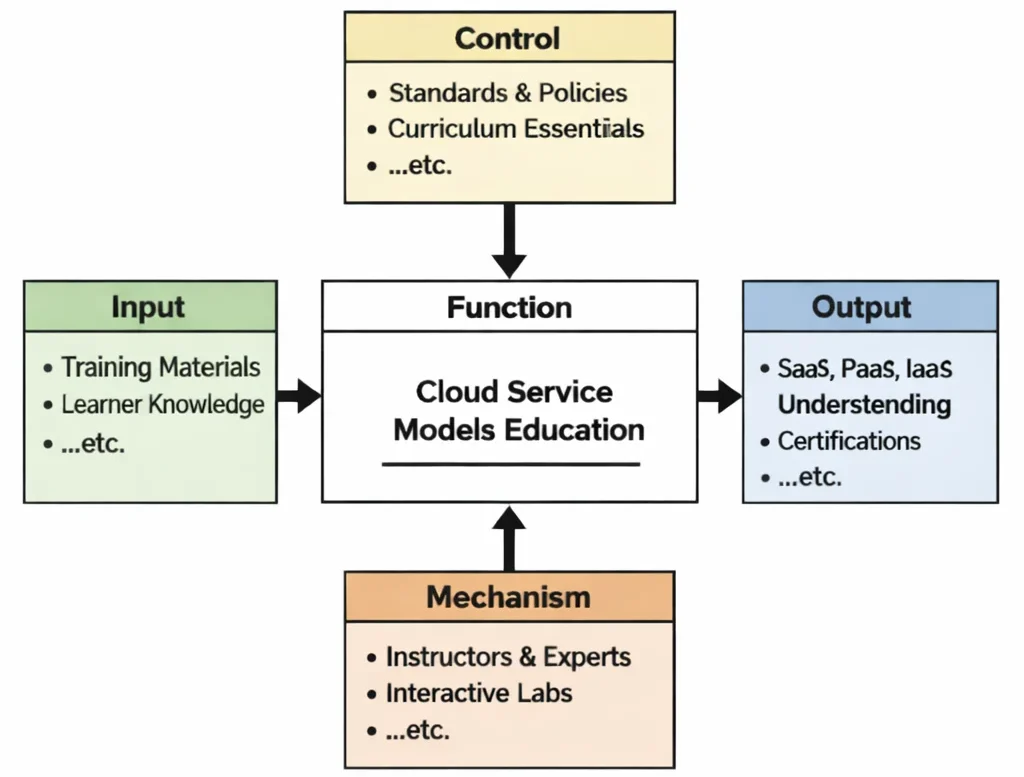
Cloud Service Models Education is, at its heart, an education in boundaries: where responsibility ends for the provider and begins for the user. The diagram shows how a learner enters with prior computing knowledge and well-chosen resources (inputs), then learns under a set of guardrails (controls)—definitions that must remain precise, security expectations that cannot be ignored, and curriculum priorities that keep the topic coherent instead of sprawling. The real engine is the mechanism layer: instructors, demonstrations, and interactive labs that let students “touch” each model through simple tasks—using a SaaS tool, building on a PaaS environment, and configuring infrastructure-like components in an IaaS setting. When the function does its work, the output is not just the ability to recite acronyms, but the ability to explain trade-offs with clarity: why SaaS can accelerate productivity, why PaaS can speed development yet constrain certain choices, and why IaaS offers flexibility while demanding stronger operational discipline. In other words, the diagram frames learning as a practical conversion—from vague familiarity into a structured way of thinking about cloud service layers.
IDEF0 diagram of Cloud Service Models Education showing Inputs, Controls, Outputs, and Mechanisms connected to a central “Function” process.
Cloud Service Models Education in IDEF0 form: guided inputs and enabling mechanisms produce SaaS/PaaS/IaaS understanding.
This IDEF0 (Input–Control–Output–Mechanism) diagram explains Cloud Service Models Education as a transformation process. Inputs such as training materials and learner knowledge flow into the central learning function. Controls—standards, policies, and curriculum essentials—shape what is emphasized and how concepts are evaluated. Mechanisms, including instructors, experts, and interactive labs, enable hands-on exploration of service layers. Outputs include clear understanding of SaaS, PaaS, and IaaS, strengthened by practical examples, assessments, and real-world decision-making skills.
Cloud service models are the backbone of the digital infrastructure that powers modern computing across industries. These models—Infrastructure as a Service (IaaS), Platform as a Service (PaaS), and Software as a Service (SaaS)—define how resources are provisioned, managed, and consumed over the internet. As a key concept within STEM and information technology, understanding service models is vital for designing scalable, secure, and cost-effective cloud architectures.
At the foundation is cloud computing, which transforms the delivery of computing resources. Service models tailor this delivery to different user needs. IaaS offers virtualized hardware like storage, servers, and networking, giving developers flexibility. PaaS simplifies application development with managed tools and platforms, while SaaS provides ready-to-use applications over the internet. Each aligns with different cloud storage and data management strategies and interacts with varied cloud deployment models such as public, private, or hybrid.
These models are deeply integrated with modern engineering practices like DevOps, CI/CD, and infrastructure as code, enabling continuous delivery and automation. Efficient networking and connectivity in the cloud is essential to support these services across distributed systems. To optimize performance, cloud solutions are often tuned using scalability, availability, and performance tuning techniques tailored to the chosen service model.
Security is a critical consideration across all service models. From data privacy to identity protection, each model brings unique challenges that must be addressed through security, compliance, and identity management. Integration with cybersecurity strategies is essential, especially when implementing multi-tenant SaaS applications or virtualized IaaS environments. Tools such as cryptography and application security help mitigate risks in cloud-hosted environments.
As cloud computing evolves, service models must support new paradigms like serverless and Functions-as-a-Service (FaaS), which abstract away infrastructure altogether. These models align with developments in virtualization and containerization, enabling microservices and lightweight deployment strategies. They also intersect with emerging technologies such as edge computing, AI integration, and internet and web technologies, extending their relevance across domains.
The rise in sophisticated threats makes cloud security an essential specialization. Students and professionals must understand frameworks like cybersecurity policy and standards for CPS security to maintain compliance and trust. Integration of AI and ML in cybersecurity brings additional layers of intelligence and automation to cloud security management. Promoting cybersecurity awareness ensures a human-centric defense strategy.
Ultimately, cloud service models represent a shift in how digital services are conceptualized, delivered, and experienced. For learners exploring emerging technologies or studying foundational artificial intelligence and machine learning, mastery of service models is essential. As innovation accelerates, professionals equipped with this knowledge are better positioned to lead in building secure, efficient, and adaptable cloud environments.
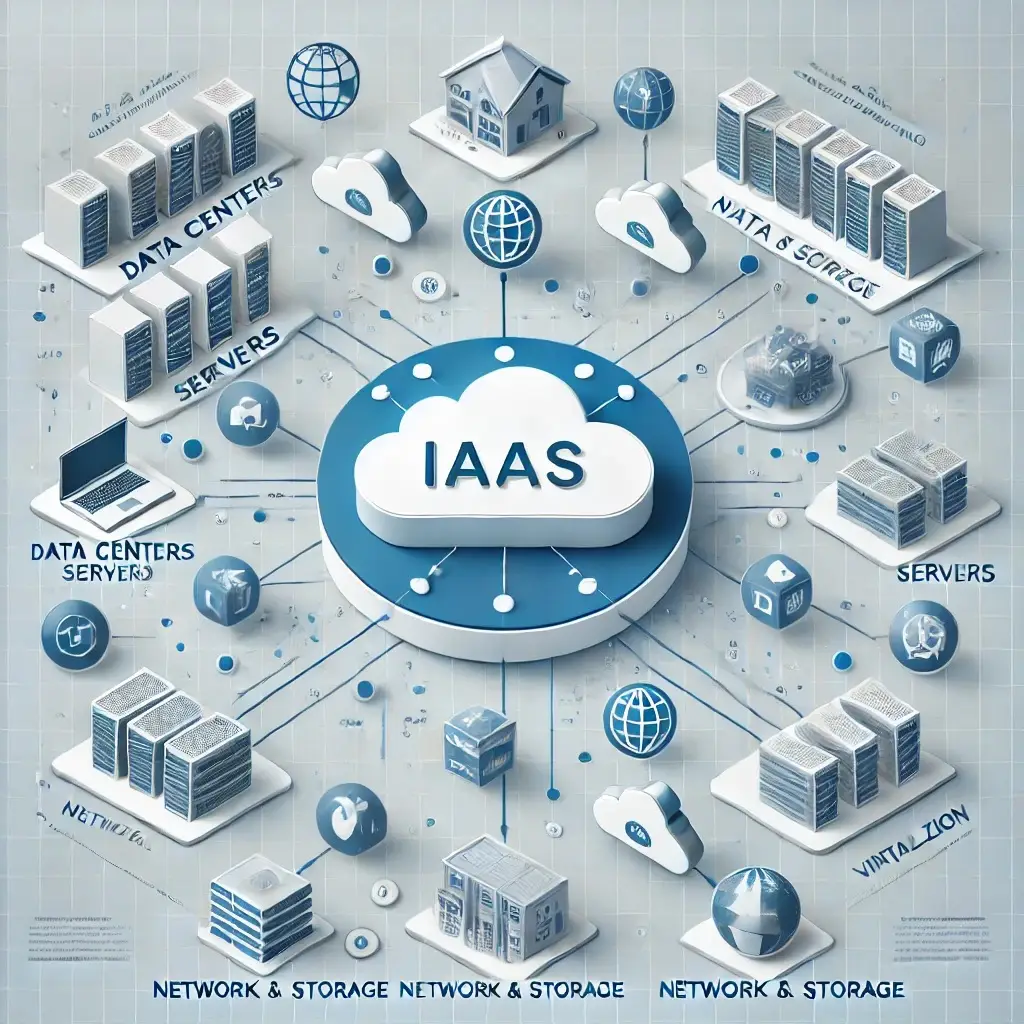
Infrastructure as a Service (IaaS) cloud model showing virtual servers, data centers, storage, and networking components.
Illustration of Infrastructure as a Service (IaaS), where cloud providers deliver virtualized computing resources including servers, storage, and networking over the internet.
This diagram illustrates the Infrastructure as a Service (IaaS) cloud computing model. It shows how cloud providers offer virtualized infrastructure components such as servers, storage systems, data centers, and networking resources. Users can deploy and manage operating systems, applications, and data on top of this infrastructure without maintaining physical hardware. IaaS forms the foundational layer of cloud service models, supporting scalable and flexible computing environments.

Building Cloud Systems: Service Abstraction Navigation

Discover how cloud service models establish clear boundaries between provider-managed hardware and tenant-controlled software across the Cloud Computing cluster. Each card details specific layer responsibilities, management scope, and operational trade-offs.

Cloud Systems Overview

Presents the overall architectural macro-view, mapping out how hardware virtualization, cloud hypervisors, managed runtimes, and web software suites deliver service abstraction.

Layers of Cloud Services

Focuses on the core SPI triad (IaaS, PaaS, SaaS), evaluating how operational control, middleware licensing, OS management, and application maintenance shift across layers.

Deployment Strategies

Explores hosting IaaS compute, PaaS application runtimes, and SaaS tools across public multi-tenant clouds, dedicated private clouds, and hybrid topologies.

Data in Distributed Systems

Details raw block device provisioning in IaaS, managed relational database services (DBaaS) in PaaS, and cloud file sharing repositories in SaaS.

Resource Abstraction

Examines hypervisor-managed VM instances in IaaS versus containerized application runtimes and application platforms managed inside PaaS environments.

Automated Delivery Systems

Covers automating IaaS server provisioning via Terraform IaC, deploying application code to PaaS via Git hooks, and configuring SaaS tools via REST APIs.

Cloud Connectivity

Details configuring low-level Virtual Private Clouds (VPCs) and routing tables in IaaS versus managed ingress routes and TLS endpoints provided automatically in PaaS/SaaS.

Scaling & Reliability

Analyzes manual auto-scaling rules and VM load balancing in IaaS compared to automated platform scaling and managed serverless concurrency in PaaS.

Trust & Governance

Enforces the Shared Responsibility Model: securing guest OS patches and firewall rules in IaaS versus configuring user RBAC and data encryption policies in SaaS.

Serverless Execution

Explores Function-as-a-Service (FaaS) as an extreme evolution of PaaS, executing event-triggered code blocks without provisioning persistent virtual server instances.

Edge & Distributed Futures

Examines extending IaaS compute nodes and PaaS micro-runtimes directly to localized edge gateways for real-time sensor processing and low-latency execution.

Architectural Anatomy of Cloud Service Models

The cloud service pyramid is structured around progressive resource abstraction, defining exactly which components of the computing stack are managed by the customer versus the cloud vendor:
  • Infrastructure as a Service (IaaS): Delivers fundamental computing, networking, and storage resources over the internet.
    • Compute & Virtualization: Virtual Machines (VMs) allowing users to install and manage custom guest operating systems (Linux, Windows).
    • Storage & Networking: Raw block volumes, object buckets, Virtual Private Clouds (VPCs), subnets, and firewalls.
    • Management Scope: The provider manages physical data centers, host servers, and hypervisors. The consumer controls OS patching, middleware, database configuration, runtime, and application code.
    • Examples: Amazon EC2, Google Compute Engine (GCE), Microsoft Azure VMs.
  • Platform as a Service (PaaS): Delivers a fully managed hardware and software platform optimized for application development, testing, and deployment.
    • Managed Runtimes: Pre-configured execution environments (Node.js, Python, Java, .NET) with built-in database management and web servers.
    • Management Scope: The provider manages physical hardware, OS updates, middleware, runtime frameworks, and automatic scaling. The consumer manages only application code and data schemas.
    • Examples: AWS Elastic Beanstalk, Heroku, Google App Engine, Azure App Service.
  • Software as a Service (SaaS): Delivers fully functional, end-user applications accessible directly through a web browser or mobile client interface.
    • Turnkey Productivity: Fully hosted applications requiring zero local installation, software configuration, or maintenance.
    • Management Scope: The provider manages the entire technology stack—from physical data centers up through application features and database backups. The user controls only local user access permissions and application settings.
    • Examples: Google Workspace (Gmail, Docs), Salesforce, Microsoft 365, Zoom, Slack.

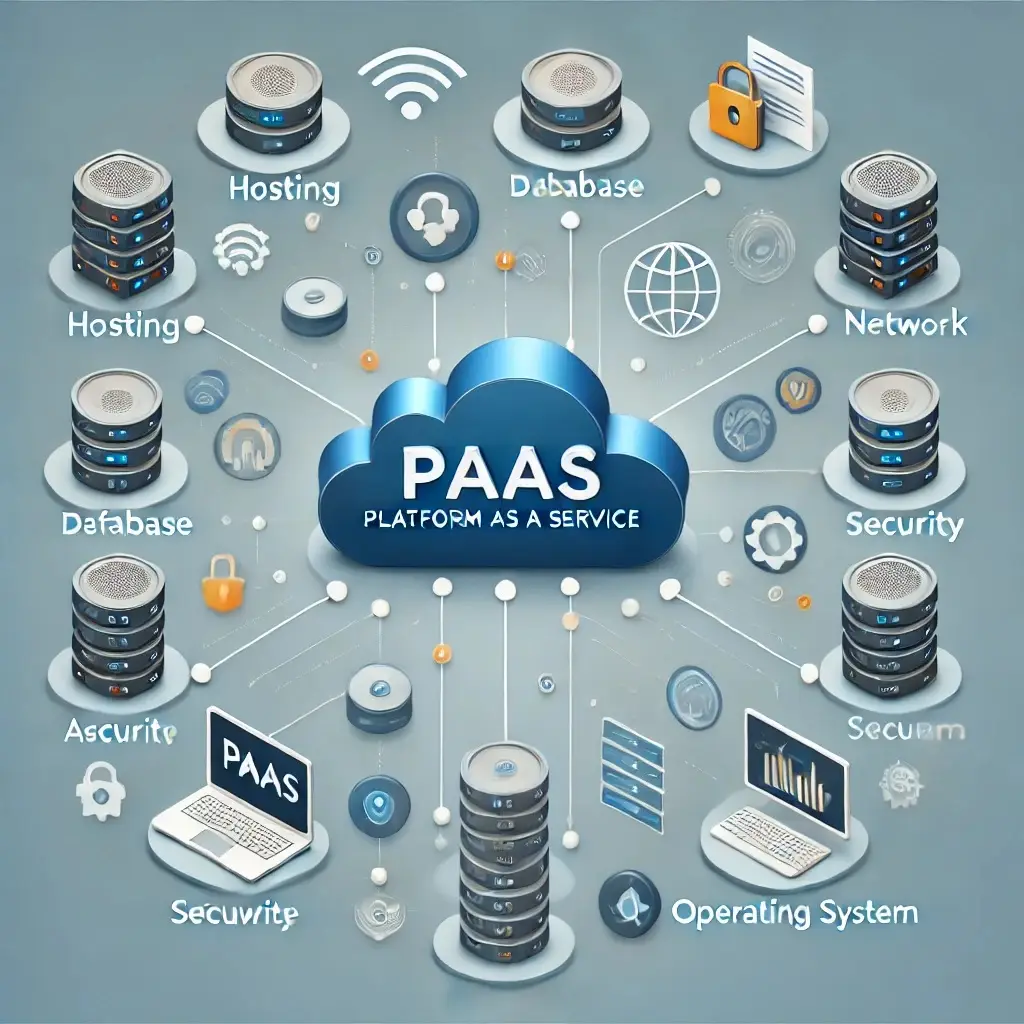
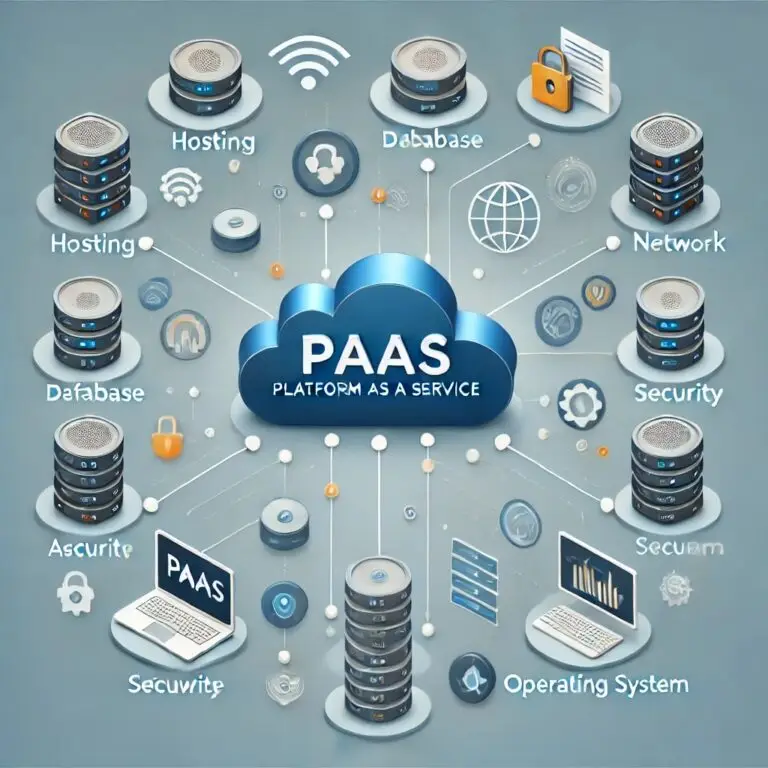
Infographic showing a central cloud labeled PAAS (Platform as a Service) connected to underlying cloud components including hosting servers, databases, networking, security layers, and user workstation interface

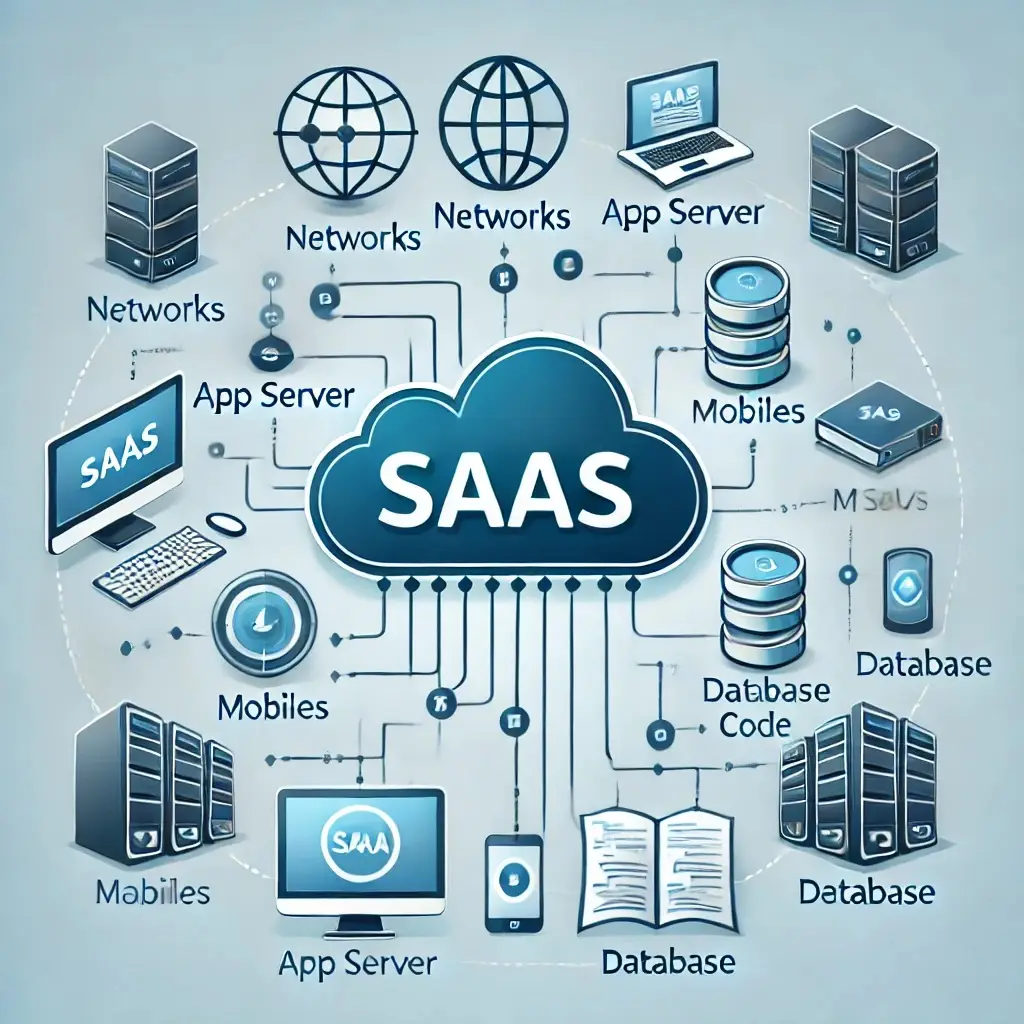
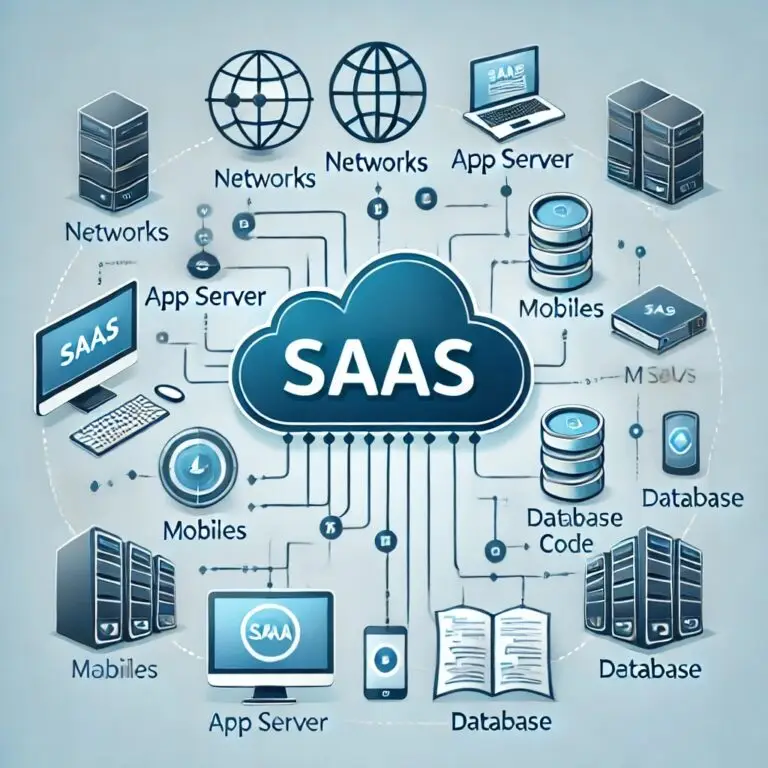
Conceptual diagram of Software as a Service (SaaS) architecture, showing a central cloud connected to end-user devices, application servers, network infrastructure, and databases.


Comparative Matrix: IaaS vs. PaaS vs. SaaS

Selecting the appropriate service model requires evaluating operational trade-offs across management scope, flexibility, setup time, and pricing models:
FeatureIaaS (Infrastructure)PaaS (Platform)SaaS (Software)
Core DefinitionVirtualized raw compute, storage, and network hardware over internet.Managed runtime platform for developers to code and deploy apps.Fully hosted, turnkey software applications delivered on demand.
Primary ObjectiveCustom server setup, network design, and infrastructure management.Rapid application development without OS maintenance overhead.End-user business productivity and immediate tool access.
Target User GroupSystems administrators, cloud architects, and DevOps engineers.Software developers, API engineers, and application teams.End-users, non-technical employees, and business analysts.
Consumer Control ScopeHigh: OS installation, middleware, data, apps, and firewall rules.Moderate: Application source code and database data models.Low: User profile configuration and account credentials only.
Cost ModelPay-as-you-go per compute instance hour, RAM, and GB bandwidth.Usage-based pricing based on platform instances and API throughput.Flat subscription per active user per month (e.g., $15/user/month).
Primary ExamplesAWS EC2, Google Compute Engine, Azure Virtual Machines.Heroku, AWS Elastic Beanstalk, Google App Engine.Salesforce, Google Workspace, Microsoft 365, Zoom.

Why Study Cloud Service Models

Mastering service models provides foundational system design capabilities for modern software careers:
  • Understanding the Building Blocks of Cloud Computing: Provides a structured clear framework for evaluating how digital applications are architected, deployed, and maintained across vendors.
  • Optimal Trade-off Decision Making: Teaches developers how to balance developer speed (PaaS/SaaS) against fine-grained infrastructure customization and control (IaaS).
  • Hands-On Engineering Capabilities: Prepares students to provision VMs in AWS, deploy containerized web apps onto Azure App Service, and configure enterprise SaaS integrations.
  • Career & Certification Pathway: Forms the core knowledge domain required for certifications such as AWS Certified Cloud Practitioner, Azure Fundamentals (AZ-900), and Google Associate Cloud Engineer.

Engineering FAQs: Cloud Service Models

What are cloud service models, and why do they matter?

Cloud service models categorize the depth of provider management versus customer control over the computing stack. The primary models (IaaS, PaaS, SaaS) dictate operational costs, maintenance responsibilities, security configuration scopes, and system architectural flexibility.

What is Infrastructure as a Service (IaaS)?

IaaS delivers on-demand virtualized hardware—including virtual servers, raw storage volumes, and virtual network subnets. The provider manages physical data center facilities, while the customer installs and maintains guest operating systems, runtime software, and applications.

What is Platform as a Service (PaaS)?

PaaS provides a fully managed environment for building, running, and scaling application code without managing underlying servers or operating system patches. The vendor manages physical hardware, operating systems, database engines, and runtime frameworks, while developers manage application source code.

What is Software as a Service (SaaS)?

SaaS delivers complete, turnkey application software over the internet via a web browser or mobile client. The cloud vendor manages the entire stack, including servers, operating systems, application updates, and data security, charging users a subscription fee.

How does Function as a Service (FaaS) or Serverless relate to PaaS?

FaaS is an advanced evolution of PaaS that abstracts infrastructure completely. Instead of provisioning an ongoing web server process, developers deploy discrete code functions that execute only when triggered by specific events (e.g., an HTTP upload), scaling to zero when idle.

Interactive Review & Problem Solving

Review Questions & Answers

1. What are cloud service models and how do they define the way IT services are delivered?


Answer: Cloud service models categorize the level of abstraction and operational responsibility shared between cloud vendors and customers. Models like IaaS, PaaS, and SaaS define whether resources are provisioned as raw hardware, managed application runtimes, or turnkey end-user software.
2. How does Infrastructure as a Service (IaaS) work and what are its primary benefits?


Answer: IaaS delivers virtualized computing hardware (VMs, block storage, VPC subnets) over the internet on a pay-as-you-go basis. Primary benefits include maximum infrastructure control, complete OS customization, zero physical hardware CapEx, and seamless scaling.
3. What is Platform as a Service (PaaS) and how does it simplify application development?


Answer: PaaS provides a managed application runtime environment with pre-configured web servers, database backends, and build pipelines. It simplifies development by removing the administrative burden of operating system installation, security patching, and server capacity tuning.
4. What distinguishes Software as a Service (SaaS) from other cloud service models?


Answer: SaaS delivers complete, hosted web software directly to end-users on a subscription basis. Unlike IaaS and PaaS, SaaS eliminates all software development and server configuration work for the user, placing 100% of underlying platform maintenance on the vendor.
5. What are the key benefits of adopting cloud service models for modern enterprises?


Answer: Benefits include converting capital hardware costs (CapEx) into variable operational expenses (OpEx), enabling rapid global scaling, reducing server maintenance labor, accelerating application delivery, and providing continuous software feature updates.
6. How do cloud service models support scalability and flexibility in IT operations?


Answer: Service models support on-demand API resource provisioning and automated scaling. Systems can automatically scale virtual machines in IaaS, dynamically allocate runtime memory in PaaS, or instantly provision user seat licenses in SaaS.
7. In what ways do security and compliance differ across IaaS, PaaS, and SaaS models?


Answer: Under the Shared Responsibility Model, IaaS customers must manage OS security patches and network firewalls. PaaS shifts OS and runtime security to the vendor, leaving application security to the customer. SaaS delegates almost all security and compliance maintenance to the vendor.
8. What factors should organizations consider when choosing a cloud service model?


Answer: Factors include internal technical expertise, required degree of system control, compliance data sovereignty mandates, application architecture compatibility, deployment speed goals, and long-term total cost of ownership (TCO).
9. How do cloud service models impact overall cost efficiency and budget management?


Answer: Service models replace large physical data center investments with transparent subscription or pay-per-use billing. This aligns IT spending directly with actual real-time system usage and business demand.
10. What future trends in cloud service models could influence their evolution and adoption?


Answer: Key trends include serverless FaaS expansion, AI-driven PaaS code generators, edge compute runtimes, container-native PaaS (Kubernetes-as-a-Service), and automated compliance enforcement.

Thought-Provoking Architectural Questions

1. How can hybrid cloud service models drive digital transformation in large enterprises?


Answer: Hybrid models bridge legacy on-premises databases with public cloud PaaS/SaaS capabilities, allowing enterprises to modernize user-facing applications rapidly without risking core legacy system rewrites.
2. What challenges do organizations face when integrating multiple cloud service models?


Answer: Challenges include multi-cloud network latency, complex identity management (IAM) integration, fragmented data security monitoring, variable vendor SLAs, and vendor-specific configuration lock-in.
3. How might vendor lock-in affect long-term strategic flexibility, and how can it be avoided?


Answer: Proprietary PaaS APIs or SaaS data formats make migrating away expensive. Organizations avoid lock-in by utilizing open-source container runtimes (Docker/Kubernetes), open database standards, and infrastructure-as-code tools (Terraform).
4. In what ways can emerging technologies like AI and blockchain enhance cloud service models?


Answer: AI optimizes automated PaaS resource scaling and threat detection, while blockchain provides immutable audit logging for multi-tenant SaaS data transactions.
5. How can organizations measure the ROI of adopting different cloud service models?


Answer: By tracking total cost of ownership (TCO) reductions, application deployment cycle acceleration, infrastructure uptime increases, and staff maintenance labor hours saved.

Numerical Engineering Problems & Solutions

Problem 1: Calculating Monthly IaaS Cost Savings
An enterprise manages an on-premise physical server infrastructure costing $12,000 per month in power, cooling, and hardware amortizations. Migrating the workload to an IaaS public cloud instance costs $7,500 per month. Calculate the monthly cost savings and annual financial savings.


Solution:

  1. Monthly cost savings = $12,000 – $7,500 = $4,500/month
  2. Annual cost savings = $4,500 × 12 months = $54,000/year

Answer: The IaaS migration saves $4,500 per month and $54,000 per year.

Problem 2: Comparing PaaS Subscription Costs Over a Year
A software startup deploys a web app to a PaaS platform costing $0.20 per compute hour. The application runs continuously across 8,000 active compute hours per month. Calculate the monthly operating cost and total annual PaaS subscription expenditure.


Solution:

  1. Monthly PaaS cost = 8,000 compute hours × $0.20/hour = $1,600/month
  2. Annual PaaS cost = $1,600 × 12 months = $19,200/year

Answer: The annual PaaS operating cost is $19,200.

Problem 3: Determining SaaS Licensing Cost Per User
A company purchases a SaaS collaboration software subscription for 500 employee users at a rate of $30 per user per month. Calculate monthly licensing total and total annual SaaS expenditure.


Solution:

  1. Monthly licensing total = 500 users × $30/user/month = $15,000/month
  2. Annual licensing cost = $15,000 × 12 months = $180,000/year

Answer: Monthly SaaS cost is $15,000, totaling $180,000 per year.

Problem 4: ROI Calculation for Migrating to a Cloud Service Model
An enterprise spends $100,000 in one-time migration and training expenses to transition legacy workloads to a cloud PaaS model. The migration yields annual operating savings of $35,000. Calculate the payback period in years and the 5-year Return on Investment (ROI) percentage.


Solution:

  1. Payback period = Initial Investment / Annual Savings = $100,000 / $35,000 ≈ 2.86 years
  2. Total 5-year cumulative savings = $35,000 × 5 years = $175,000
  3. Net financial gain = $175,000 – $100,000 = $75,000
  4. 5-Year ROI = (Net Gain / Initial Investment) × 100 = ($75,000 / $100,000) × 100 = 75.0%

Answer: The project achieves a payback period of 2.86 years with a 5-year ROI of 75%.

Problem 5: Computing Utilization Improvement in a Hybrid Cloud
An on-premise data center operates at an average server capacity utilization rate of 50%. Shifting variable batch workloads to a public cloud PaaS increases core on-premise server utilization to 70%. Calculate absolute utilization improvement and relative percentage efficiency gain.


Solution:

  1. Absolute increase = 70% – 50% = 20 percentage points
  2. Relative percentage improvement = (20% / 50%) × 100 = 40.0%

Answer: Capacity utilization increased by 20 percentage points, representing a 40% relative efficiency gain.

Problem 6: Estimating Data Transfer Costs for a SaaS Application
A SaaS application processes 10 TB of monthly outbound customer data egress (10 TB = 10,240 GB). The cloud provider charges $0.08 per GB of egress data. Calculate the monthly data transfer cost and annual egress expenditure.


Solution:

  1. Convert 10 TB to Gigabytes: 10 × 1,024 GB = 10,240 GB
  2. Monthly egress cost = 10,240 GB × $0.08/GB = $819.20
  3. Annual data egress cost = $819.20 × 12 months = $9,830.40

Answer: Monthly egress data transfer costs $819.20, totaling $9,830.40 annually.

Problem 7: Calculating Break-even Point for a Cloud Migration Project
A cloud migration project requires an upfront integration investment of $150,000 and generates operational efficiency savings of $12,000 per month. Calculate the exact break-even payback period in months.


Solution:

  1. Break-even payback period = $150,000 / $12,000 = 12.5 months
  2. Operational break-even occurs in the 13th month of continuous operation.

Answer: The break-even point is reached in 12.5 months (13th operational month).

Problem 8: Determining the Cost per Compute Hour in an IaaS Model
An enterprise receives a monthly IaaS bill of $9,600 for running a cluster of virtual machines for a total of 40,000 aggregate compute hours in a 30-day month. Calculate the effective hourly cost per compute hour.


Solution:

  1. Cost per compute hour = Total Monthly Bill / Total Compute Hours = $9,600 / 40,000 hours = $0.24 per hour

Answer: The effective IaaS compute cost is $0.24 per compute hour.

Problem 9: Calculating Annual Storage Cost Savings Between Two Models
A business stores 20 TB of data (20,480 GB). On-premise SAN storage costs $0.18 per GB per month in power and maintenance, while cloud object storage costs $0.06 per GB per month. Calculate monthly storage cost savings and total annual savings.


Solution:

  1. Convert 20 TB to GB: 20 × 1,024 GB = 20,480 GB
  2. On-premise monthly cost = 20,480 GB × $0.18 = $3,686.40
  3. Cloud storage monthly cost = 20,480 GB × $0.06 = $1,228.80
  4. Monthly cost savings = $3,686.40 – $1,228.80 = $2,457.60/month
  5. Annual cost savings = $2,457.60 × 12 months = $29,491.20/year

Answer: Cloud object storage saves $2,457.60 per month and $29,491.20 per year.

Problem 10: Estimating Latency Improvement with a Cloud CDN
A web application displays an un-cached origin response latency of 250 ms. Routing static assets through a global Cloud CDN reduces response latency to 150 ms. Calculate absolute latency reduction and percentage speedup.


Solution:

  1. Absolute latency saved = 250 ms – 150 ms = 100 ms
  2. Percentage latency reduction = (100 ms / 250 ms) × 100 = 40.0%

Answer: Response latency improved by 100 ms, representing a 40% speedup.

Problem 11: Multi-Cloud Deployment Cost Comparison Analysis
An application consumes 50,000 compute hours monthly. Cloud Provider A charges $0.22 per compute hour, while Cloud Provider B charges $0.18 per compute hour for equivalent specs. Calculate monthly savings and total annual cost savings achieved by selecting Cloud Provider B.


Solution:

  1. Provider A monthly cost = 50,000 × $0.22 = $11,000
  2. Provider B monthly cost = 50,000 × $0.18 = $9,000
  3. Monthly cost savings = $11,000 – $9,000 = $2,000/month
  4. Annual cost savings = $2,000 × 12 months = $24,000/year

Answer: Choosing Provider B saves $2,000 per month and $24,000 per year.

Problem 12: Calculating Total TCO Reduction from Adopting a Cloud Service Model
An enterprise’s traditional IT Total Cost of Ownership (TCO) amortizes to $250,000 per year. Transitioning to a managed PaaS model reduces overall annual maintenance, power, and labor TCO by 30%. Calculate the net cost reduction in dollars and the new annual TCO.


Solution:

  1. Annual TCO reduction = $250,000 × 0.30 = $75,000
  2. New total annual TCO = $250,000 – $75,000 = $175,000

Answer: Cloud adoption saves $75,000 per year, lowering annual TCO to $175,000.


Cloud Service Models — Summary & Wrap-Up

Cloud service models provide varying levels of control, flexibility, and abstraction, allowing organizations to select the most suitable option based on their operational requirements. IaaS provides maximum control over virtualized servers and networks; PaaS streamlines application development by managing OS and runtime environments; and SaaS delivers ready-to-use software applications over the web with zero infrastructure overhead. Mastering these service models enables architects and developers to build resilient, cost-effective, and scalable cloud solutions.

Infrastructure as a Service (IaaS)

IaaS is the foundational cloud service model that provides virtualized computing resources over the internet. It offers flexibility and scalability, allowing businesses to rent servers, storage, and networking infrastructure on a pay-as-you-go basis. Key features of IaaS include:

Compute Resources:

Virtual machines (VMs) that can run different operating systems and applications.

Storage Solutions:

Scalable storage options such as block storage, file storage, and object storage to handle various data needs.

Networking:

Virtual networks, load balancers, and firewalls to establish secure and efficient communication.

Use Cases:

Development and testing environments, disaster recovery, and hosting websites or applications.

Examples of IaaS providers:

Amazon Web Services (AWS EC2), Microsoft Azure Virtual Machines, and Google Compute Engine.

Infrastructure as a Service (IaaS) cloud model showing virtual servers, data centers, storage, and etworking components

Platform as a Service (PaaS)

PaaS provides a platform that abstracts away the complexities of managing infrastructure, enabling developers to focus on building, deploying, and scaling applications. It includes pre-configured environments with tools and services for application development. Key aspects of PaaS include:

Runtime Environments:

Managed operating systems, frameworks, and middleware to support specific programming languages and tools.

Development Tools:

Integrated development environments (IDEs), version control, and CI/CD pipelines.

Database Management:

Preconfigured databases and data processing services.

Use Cases:

Rapid application development, integration of APIs, and microservices deployment.

Examples of PaaS providers:

Heroku, Google App Engine, and Microsoft Azure App Service.

Conceptual diagram of Platform as a Service (PaaS) architecture illustrating integrated cloud infrastructure, hosting servers, databases, security, and developer operating systems.

Software as a Service (SaaS)

SaaS delivers fully functional, user-ready software applications over the internet. These applications are managed and maintained by the service provider, requiring no installation or management effort from the end-user. Key features of SaaS include:

Accessibility:

Users can access the software through a web browser or mobile application from anywhere with an internet connection.

Automatic Updates:

Providers handle updates, patches, and maintenance without user intervention.

Subscription Model:

Typically offered on a subscription basis, providing scalability based on user needs.

Use Cases:

Business tools like customer relationship management (CRM), enterprise resource planning (ERP), and collaborative platforms.

Examples of SaaS applications:

Google Workspace (Docs, Sheets, Gmail), Salesforce, and Zoom.

Cloud Service Models: Conclusion

These cloud service models provide varying levels of control, flexibility, and abstraction, allowing organizations to select the most suitable option based on their requirements.
Conceptual diagram of Software as a Service (SaaS) architecture, showing a central cloud connected to end-user devices, application servers, network infrastructure, and databases.
body { font-family: Arial, sans-serif; margin: 20px; } table { width: 100%; border-collapse: collapse; margin-bottom: 20px; } th, td { border: 1px solid #ccc; padding: 10px; text-align: left; } th { background-color: #f4f4f4; } tr:nth-child(even) { background-color: #f9f9f9; }

Differences Between IaaS, PaaS, and SaaS

FeatureIaaS (Infrastructure as a Service)PaaS (Platform as a Service)SaaS (Software as a Service)
DefinitionProvides virtualized computing resources like servers, storage, and networking.Offers a platform for developers to build, deploy, and manage applications without worrying about underlying infrastructure.Delivers fully managed software applications accessible via the internet.
PurposeInfrastructure setup and management.Application development and deployment.End-user productivity and access to software applications.
Target AudienceIT administrators and system architects.Developers and IT teams focused on coding and application deployment.End-users needing specific software functionality.
Management ScopeUser manages operating systems, applications, middleware, and runtime.User manages applications and data; the provider manages everything else.Provider manages the entire application, infrastructure, and data.
Use Cases- Hosting websites and applications
- Backup and disaster recovery
- Development and testing environments
- Custom application development
- API integrations
- Rapid deployment of web applications
- Email services
- CRM tools
- Collaboration platforms
ExamplesAmazon EC2, Google Compute Engine, Microsoft Azure Virtual MachinesHeroku, Google App Engine, Microsoft Azure App ServiceGmail, Salesforce, Microsoft 365
ScalabilityHighly scalable for infrastructure needs.Scalable for application development environments.Scalability based on the number of users or subscription level.
CustomizationFull customization of servers, storage, and networking.Limited customization to focus on application design and functionality.Minimal customization; users adapt to the software as provided.
Cost ModelPay-as-you-go for resources used (compute, storage, network).Pay for usage based on platform access and development tools.Subscription-based pricing for software access.
Setup TimeLonger setup time for configuring infrastructure.Medium setup time as platforms are pre-configured.Minimal setup time; ready-to-use software.
Control LevelHigh level of control over infrastructure.Moderate control over applications and data.Low control; focus is on software usage, not management.
Example ProvidersAWS, Microsoft Azure, Google CloudHeroku, AWS Elastic Beanstalk, Google App EngineDropbox, Zoom, Slack

Why Study Cloud Service Models

Understanding the Building Blocks of Cloud-Based Computing

Cloud service models define the level of control, responsibility, and flexibility users have when accessing computing resources through the cloud. For students preparing for university, studying cloud service models provides a clear framework for how modern digital services are built, delivered, and maintained. It lays the groundwork for understanding how businesses and developers interact with cloud platforms to support innovation, scalability, and efficiency.

Exploring IaaS, PaaS, and SaaS in Depth

Students learn about the three primary service models: Infrastructure as a Service (IaaS), which provides virtualized computing resources like servers and storage; Platform as a Service (PaaS), which offers a development environment for building applications; and Software as a Service (SaaS), which delivers ready-to-use software over the internet. Understanding these models helps students see how cloud computing supports a wide range of users, from infrastructure managers to software end-users.

Matching Service Models to Use Cases and User Needs

Each service model serves different technical and business needs. IaaS is ideal for organizations that need control over their environment, PaaS supports rapid development without infrastructure overhead, and SaaS provides cost-effective access to fully managed applications. Students develop critical thinking skills to assess requirements and recommend the most appropriate model based on scalability, cost, and complexity.

Developing Hands-On Skills in Cloud Environments

Through exposure to platforms such as AWS, Azure, and Google Cloud, students gain practical experience in provisioning resources, deploying applications, and managing cloud-based tools across various service models. These skills are crucial for careers in cloud engineering, DevOps, application development, and IT support—fields that demand proficiency in selecting and integrating cloud services.

Preparing for Advanced Study and Careers in Technology

A solid understanding of cloud service models supports further study in software engineering, systems architecture, cybersecurity, and enterprise IT. It also provides a strong foundation for certifications such as AWS Certified Cloud Practitioner or Microsoft Azure Fundamentals. For university-bound learners, studying cloud service models offers a valuable perspective on how today’s digital services are structured and how tomorrow’s innovations will be delivered.

Cloud Service Models – Frequently Asked Questions

These FAQs introduce Infrastructure, Platform, and Software as a Service and show how each model affects control, cost, and learning opportunities in cloud computing.

What are cloud service models, and why do they matter?

Cloud service models describe the level of control and responsibility shared between a cloud provider and the customer. The three main models are Infrastructure as a Service (IaaS), Platform as a Service (PaaS), and Software as a Service (SaaS). They matter because they determine what you manage yourself (such as virtual machines, runtimes, and applications) and what the provider manages for you, which in turn affects cost, flexibility, maintenance effort, and the kinds of solutions you can build in study projects or professional environments.

What is Infrastructure as a Service (IaaS)?

Infrastructure as a Service (IaaS) provides on-demand access to fundamental computing resources such as virtual machines, storage, and networking over the internet. The cloud provider manages the physical hardware and virtualisation layer, while the customer is responsible for installing and maintaining operating systems, middleware, and applications. IaaS is useful when you want fine-grained control over the environment but do not want to operate your own physical data centre, making it a good learning platform for systems administration and infrastructure design.

What is Platform as a Service (PaaS)?

Platform as a Service (PaaS) offers a managed environment for developing, running, and deploying applications without having to manage the underlying servers and operating systems. The cloud provider looks after infrastructure, operating systems, runtime environments, and often databases or message queues, while the customer focuses mainly on application code and configuration. PaaS is ideal for students and developers who want to concentrate on software features and experimentation rather than spending time on low-level infrastructure setup and patching.

What is Software as a Service (SaaS)?

Software as a Service (SaaS) delivers complete applications over the internet that users access through a web browser or client app. The provider manages everything, including infrastructure, platforms, application updates, and security patches, while users simply sign in and use the software. Common examples include cloud-based email, office suites, learning platforms, and customer relationship management tools, which require no installation and are billed on a subscription or usage basis.

How do IaaS, PaaS, and SaaS differ in terms of control and responsibility?

In IaaS, the customer controls the operating systems, middleware, and applications, while the provider manages physical hardware, storage, and networking. In PaaS, the provider also manages the operating systems and runtime environment, leaving the customer to handle only the application and its data. In SaaS, almost everything is managed by the provider, and the customer mainly configures the application and looks after user data and access. As you move from IaaS to SaaS, you give up some control in exchange for reduced maintenance and faster time to value.

What is Function as a Service (FaaS) or serverless computing in the context of service models?

Function as a Service (FaaS), often called serverless computing, is a specialised cloud service model where you deploy small pieces of code, known as functions, that run in response to events. The cloud provider automatically manages the servers, scaling, and execution environment, so you are charged based on actual usage rather than reserved capacity. FaaS fits well with event-driven workloads, rapid prototyping, and microservices, and it helps students see how cloud-native architectures can minimise infrastructure concerns and focus on business logic.

How should an organisation choose between IaaS, PaaS, and SaaS for a new project?

Choosing a service model depends on how much control the organisation needs, how quickly it must deliver value, and what skills are available. IaaS is suitable when there are strong infrastructure skills and a need for custom environments. PaaS is appropriate when the team wants to accelerate development and avoid managing operating systems and databases. SaaS is the best fit when the required functionality already exists as a mature cloud application and the main task is to configure and integrate it rather than build from scratch.

What are the cost and scalability implications of different cloud service models?

IaaS typically offers flexible scaling with pay-as-you-go pricing for compute, storage, and network resources, but customers must monitor and right-size their virtual machines to control costs. PaaS abstracts more infrastructure details, often including automatic scaling and managed services that can reduce operational overhead, though pricing may depend on higher-level metrics such as requests or database size. SaaS usually has predictable subscription pricing per user or per feature set, with scalability largely handled by the provider, making it easier to budget but less flexible in terms of underlying resource tuning.

Which cloud service models are most relevant for students preparing for IT and software careers?

For students, understanding all three major service models is valuable. IaaS helps you learn about virtual machines, networking, and system administration. PaaS helps you practice deploying web applications, APIs, and databases in managed environments. SaaS encourages you to think about integration, configuration, and user experience. Exposure to serverless and FaaS adds insight into modern, event-driven architectures that are increasingly used in industry for building scalable, cloud-native systems.

Cloud Service Models – Review Questions and Answers:

1. What are cloud service models and how do they define the way IT services are delivered?Answer: Cloud service models are frameworks that categorize the types of services provided over the internet, typically including Infrastructure as a Service (IaaS), Platform as a Service (PaaS), and Software as a Service (SaaS). They define how resources, applications, and storage are managed, delivered, and consumed by organizations. This classification helps businesses choose solutions that best align with their operational requirements, scalability needs, and budget constraints. The clear delineation among these models enables organizations to deploy the most appropriate technology mix to support digital transformation.2. How does Infrastructure as a Service (IaaS) work and what are its primary benefits? Answer: IaaS provides virtualized computing resources over the internet, allowing organizations to rent servers, storage, and networking hardware on demand. It eliminates the need for large upfront investments in physical infrastructure by offering a pay-as-you-go model. This service model gives businesses the flexibility to scale resources according to their workload requirements while maintaining control over operating systems and applications. The primary benefits include cost efficiency, scalability, and the ability to rapidly deploy and manage IT infrastructure without significant capital expenditure.3. What is Platform as a Service (PaaS) and how does it simplify application development? Answer: PaaS is a cloud service model that offers a complete development and deployment environment in the cloud, including hardware, software, and development tools. It simplifies application development by providing pre-configured environments that reduce the complexity of setting up and maintaining the underlying infrastructure. Developers can focus on writing code and developing innovative applications without worrying about server management or software updates. This model accelerates development cycles, improves collaboration among development teams, and enhances the overall efficiency of the software delivery process.4. What distinguishes Software as a Service (SaaS) from other cloud service models? Answer: SaaS delivers software applications over the internet on a subscription basis, eliminating the need for local installation and maintenance. Unlike IaaS and PaaS, which offer infrastructure and development platforms respectively, SaaS provides ready-to-use software solutions that are managed by the provider. This model allows users to access applications from any device with an internet connection, ensuring convenience and mobility. SaaS also reduces the burden on IT departments by handling upgrades, security patches, and maintenance, thereby lowering overall operational costs.5. What are the key benefits of adopting cloud service models for modern enterprises? Answer: Cloud service models offer several key benefits, including cost savings, scalability, flexibility, and improved operational efficiency. They enable businesses to convert capital expenditures into operational expenditures through pay-as-you-go pricing, reducing the need for large upfront investments. Additionally, cloud models allow rapid scaling of resources to meet fluctuating demands and support innovative solutions that drive competitive advantage. The enhanced collaboration, accessibility, and reliability of cloud services further empower organizations to focus on strategic initiatives rather than routine maintenance.6. How do cloud service models support scalability and flexibility in IT operations? Answer: Cloud service models are designed to offer high scalability by allowing organizations to quickly adjust their resource usage based on real-time demand. This elasticity means that businesses can scale their infrastructure, platforms, or applications up or down without delay, ensuring optimal performance during peak periods. Flexibility is achieved through on-demand resource allocation, which lets organizations experiment with new services and deploy solutions rapidly. As a result, cloud service models enable a dynamic and agile IT environment that can adapt to evolving business requirements and market conditions.7. In what ways do security and compliance differ across IaaS, PaaS, and SaaS models? Answer: Security and compliance responsibilities vary across cloud service models, with each model offering a different balance of provider and customer control. In IaaS, the provider manages the physical infrastructure while the customer is responsible for securing the operating system, applications, and data. PaaS reduces the customer’s burden by managing the underlying platform, though customers must still secure their applications. SaaS, on the other hand, places most of the security and compliance responsibilities on the provider, allowing customers to focus on using the application while relying on the vendor to adhere to strict security standards and regulatory requirements.8. What factors should organizations consider when choosing a cloud service model? Answer: Organizations should consider factors such as cost, scalability, control, security, and compliance when choosing a cloud service model. They must evaluate their current IT infrastructure, application requirements, and future growth plans to determine which model best meets their needs. Additionally, the level of customization, ease of integration with existing systems, and the provider’s service-level agreements (SLAs) are critical considerations. By assessing these factors, businesses can select a cloud service model that aligns with their strategic objectives and operational constraints while ensuring optimal performance and security.9. How do cloud service models impact overall cost efficiency and budget management? Answer: Cloud service models significantly impact cost efficiency by shifting capital expenditures to operational expenditures through subscription-based pricing and on-demand resource allocation. This model minimizes upfront investments in physical infrastructure and reduces ongoing maintenance costs. It also provides predictable budgeting by allowing businesses to pay only for the resources they use, which is particularly beneficial during periods of fluctuating demand. As a result, organizations can optimize their IT spending, reallocate funds to innovation, and maintain a flexible budget that supports digital transformation initiatives.10. What future trends in cloud service models could influence their evolution and adoption? Answer: Future trends in cloud service models include the integration of emerging technologies such as artificial intelligence, machine learning, blockchain, and edge computing. These innovations are likely to enhance automation, security, and real-time data processing capabilities, further optimizing cloud services for modern applications. Additionally, increasing emphasis on sustainability and regulatory compliance will drive the development of greener and more secure cloud infrastructures. As cloud service models continue to evolve, they will play a critical role in enabling digital transformation and supporting innovative business strategies across industries.

Cloud Service Models – Thought-Provoking Questions and Answers

1. How can hybrid cloud service models drive digital transformation in large enterprises? Answer: Hybrid cloud service models enable large enterprises to leverage both private and public cloud environments, balancing security, compliance, and scalability. This approach allows organizations to run sensitive workloads on private clouds while taking advantage of the flexibility and cost-effectiveness of public clouds for less critical applications. The resulting infrastructure supports rapid innovation, efficient resource utilization, and enhanced business agility. By integrating diverse cloud solutions, enterprises can transform their IT operations to meet modern demands and drive digital transformation initiatives effectively. The strategic implementation of hybrid cloud models can also foster a culture of continuous improvement and innovation. As organizations migrate legacy systems to more dynamic environments, they can reallocate resources toward developing new digital services and enhancing customer experiences. This shift not only modernizes IT infrastructure but also creates a competitive edge in an increasingly digital marketplace.2. What challenges do organizations face when integrating multiple cloud service models, and how can they overcome these hurdles? Answer: Integrating multiple cloud service models often presents challenges related to interoperability, data migration, security consistency, and vendor lock-in. Organizations must contend with the complexity of managing disparate systems and ensuring seamless communication between public, private, and hybrid clouds. Overcoming these hurdles requires robust cloud management platforms, standardized protocols, and comprehensive data governance strategies. Addressing these challenges proactively allows organizations to maximize the benefits of a multi-cloud approach while minimizing operational risks. To further mitigate integration issues, companies should invest in cloud-agnostic tools and foster strong partnerships with reliable vendors. These strategies help ensure that different cloud environments work together harmoniously, enabling smooth transitions and consistent performance. Ultimately, effective planning, ongoing monitoring, and continuous improvement are key to successfully integrating multiple cloud service models.3. How might vendor lock-in affect the long-term strategic flexibility of an organization’s cloud deployment, and what measures can be taken to avoid it? Answer: Vendor lock-in can restrict an organization’s long-term strategic flexibility by tying them to a specific provider’s proprietary technologies and pricing models. This dependency can hinder the ability to switch vendors, adopt new technologies, or negotiate favorable terms in the future. To avoid vendor lock-in, organizations should consider adopting multi-cloud or hybrid strategies that distribute workloads across several providers. They should also prioritize open standards, interoperability, and cloud-agnostic tools to ensure portability and reduce dependency on a single vendor. By designing systems with flexibility in mind, companies can maintain control over their IT environments and remain agile in response to market changes. Strategic planning, contractual safeguards, and ongoing evaluation of cloud services further empower organizations to navigate the challenges of vendor lock-in effectively. This proactive approach ensures that businesses can leverage cloud innovations without being constrained by a single provider’s ecosystem.4. In what ways can emerging technologies like AI and blockchain enhance the capabilities of cloud service models? Answer: Emerging technologies such as AI and blockchain can significantly enhance cloud service models by improving automation, security, and data analytics. AI algorithms can optimize resource allocation, predict workload demands, and automate routine maintenance tasks, resulting in more efficient cloud operations. Blockchain technology, with its decentralized and immutable ledger, can improve data integrity and transparency, making cloud services more secure and trustworthy. The integration of these technologies can lead to smarter, more responsive cloud environments that support innovative applications and drive digital transformation. The synergy between AI, blockchain, and cloud services also paves the way for new service models and business opportunities. For instance, AI-powered analytics can provide deep insights into cloud usage patterns, while blockchain can facilitate secure, verifiable transactions across multi-cloud environments. Together, these technologies offer a robust framework for building the next generation of cloud services that are both agile and resilient in the face of evolving digital challenges.5. How can organizations measure the ROI of adopting different cloud service models, and what key performance indicators should they consider? Answer: Organizations can measure the ROI of cloud service models by evaluating cost savings, performance improvements, scalability, and time-to-market reductions. Key performance indicators (KPIs) such as total cost of ownership (TCO), operational efficiency, resource utilization, and application uptime provide quantifiable metrics for assessing the financial and operational impact of cloud adoption. By comparing these KPIs before and after migration, businesses can determine the value derived from shifting to cloud-based services. This data-driven approach enables informed decision-making and supports continuous improvement initiatives. In addition to financial metrics, organizations should also consider qualitative factors such as enhanced innovation capabilities, improved customer satisfaction, and increased agility. Collectively, these indicators offer a comprehensive view of the ROI and help businesses justify investments in cloud service models. Regular performance reviews and benchmarking against industry standards further ensure that cloud strategies remain aligned with overall business objectives.6. What are the potential security implications of each cloud service model, and how can organizations mitigate associated risks? Answer: Each cloud service model—whether IaaS, PaaS, or SaaS—presents unique security challenges that stem from varying degrees of control and shared responsibility. IaaS requires organizations to manage security at the operating system and application levels, while PaaS shifts some of that burden to the provider, and SaaS relies heavily on the vendor’s security measures. Potential security implications include data breaches, unauthorized access, and compliance risks. To mitigate these risks, organizations must implement robust security protocols, regular audits, and comprehensive access controls tailored to each model’s characteristics. Effective risk mitigation also involves selecting reputable cloud providers with strong security track records and clear SLAs. Continuous monitoring, encryption of sensitive data, and employee training on best practices further enhance the security posture. By adopting a layered security approach and staying informed about emerging threats, organizations can protect their cloud environments and maintain trust with their stakeholders.7. How might evolving regulatory requirements shape the future adoption of cloud service models across different industries? Answer: Evolving regulatory requirements have a significant influence on the adoption of cloud service models, particularly in industries with strict data protection and compliance mandates such as healthcare, finance, and government. As regulations become more stringent, organizations may be compelled to adopt cloud models that offer enhanced security and control, such as private or hybrid clouds. Compliance with data sovereignty, privacy, and auditability standards will drive the selection of cloud services that can be tailored to meet specific legal and industry requirements. This dynamic regulatory landscape encourages providers to innovate and offer more secure, compliant solutions. In response to these pressures, cloud vendors are likely to invest in advanced security features, automated compliance tools, and transparent data management practices. Organizations will benefit from these improvements by gaining access to solutions that not only meet regulatory standards but also support digital transformation. The continuous evolution of regulations will thus play a crucial role in shaping the strategic direction of cloud service adoption across various sectors.8. What strategies can organizations implement to ensure interoperability and seamless integration across multiple cloud service models? Answer: To ensure interoperability and seamless integration across multiple cloud service models, organizations should adopt standardized protocols and cloud-agnostic tools that facilitate data portability and system compatibility. Establishing clear data governance policies and leveraging APIs for integration are key strategies that enable different cloud environments to communicate effectively. Additionally, utilizing middleware solutions and cloud management platforms can streamline the orchestration of hybrid and multi-cloud architectures. These strategies help maintain operational continuity and allow organizations to harness the unique advantages of each cloud model without compromising on performance. Moreover, organizations should engage in thorough planning and pilot testing to identify potential integration challenges early in the process. Continuous monitoring and performance evaluation, combined with a flexible IT strategy, ensure that the deployed solutions remain adaptable to evolving technology trends. This proactive approach minimizes integration issues and supports a robust, unified cloud ecosystem that drives overall business success.9. How can organizations leverage cloud service models to accelerate innovation and reduce time-to-market for new products? Answer: Cloud service models enable organizations to accelerate innovation by providing scalable, on-demand resources that facilitate rapid prototyping, testing, and deployment of new products. By leveraging IaaS, PaaS, and SaaS, companies can quickly access the tools and infrastructure needed to develop innovative solutions without significant upfront investments. This agility reduces time-to-market by streamlining the development process and allowing teams to iterate rapidly. The flexibility offered by cloud environments also encourages experimentation, driving continuous improvement and competitive differentiation. In addition, cloud-based collaboration platforms and integrated development environments support cross-functional teams in working more efficiently. The ease of scaling resources during peak development phases further ensures that projects are completed on schedule. As a result, organizations can respond faster to market demands and bring innovative products to market with minimal delays, ultimately enhancing their competitive edge.10. What role does automation play in enhancing the efficiency and performance of cloud service models? Answer: Automation plays a critical role in enhancing the efficiency and performance of cloud service models by streamlining routine tasks such as resource provisioning, scaling, and system maintenance. Automated processes reduce the potential for human error and accelerate the deployment of IT services, resulting in improved uptime and reliability. By implementing automation tools, organizations can optimize resource utilization, quickly respond to changes in workload demands, and ensure consistent performance across their cloud environments. This leads to significant cost savings and allows IT teams to focus on strategic initiatives rather than manual operations. Furthermore, automation enables continuous monitoring and proactive maintenance, which enhances security and compliance across cloud platforms. The ability to rapidly scale resources in response to real-time demand further contributes to operational efficiency. As cloud environments become increasingly complex, automation remains a key enabler of agility, resilience, and sustained performance.11. How might the integration of edge computing with cloud service models transform data processing and application delivery? Answer: The integration of edge computing with cloud service models can transform data processing by decentralizing computation and bringing processing power closer to data sources. This convergence reduces latency, enhances real-time analytics, and improves the overall responsiveness of applications. By offloading time-sensitive tasks to edge devices, organizations can optimize network bandwidth and reduce the load on centralized cloud infrastructure. The combined model supports a more distributed computing environment that is well-suited for emerging technologies such as IoT and autonomous systems. This hybrid approach also facilitates faster decision-making and improved user experiences by delivering content and services with minimal delay. As edge and cloud computing continue to evolve together, they will drive innovation in application delivery and data processing, enabling new business models and more agile IT operations. The integration ultimately leads to a more resilient and efficient digital ecosystem that meets the demands of a rapidly changing technological landscape.12. What long-term economic impacts might result from widespread adoption of advanced cloud service models in global markets? Answer: Widespread adoption of advanced cloud service models is likely to drive significant long-term economic impacts by reducing IT costs, fostering innovation, and creating new business opportunities across global markets. As organizations shift from capital-intensive on-premise infrastructures to flexible, cloud-based solutions, they can achieve substantial cost savings and reinvest those funds into growth and development. This transition supports a more agile and competitive business environment, encouraging startups and established companies alike to innovate and scale rapidly. The resulting economic benefits extend beyond individual organizations, contributing to broader industry growth and digital transformation worldwide. Furthermore, the efficiency gains and enhanced productivity derived from cloud adoption can stimulate job creation and support the development of new markets and services. As businesses harness the power of advanced cloud technologies, they will be better positioned to adapt to evolving market trends, driving sustainable economic growth on a global scale. This dynamic shift not only transforms traditional business models but also lays the groundwork for a more interconnected and resilient global economy.

Cloud Service Models – Numerical Problems and Solutions

1. Calculating Monthly IaaS Cost Savings Solution: Step 1: Assume an on-premise server costs $12,000 per month while an IaaS solution costs $7,500 per month. Step 2: Compute the monthly savings: $12,000 – $7,500 = $4,500. Step 3: Determine the annual savings: $4,500 × 12 = $54,000.2. Comparing PaaS Subscription Costs Over a Year Solution: Step 1: Suppose a PaaS subscription is $0.20 per compute hour and usage is 8,000 hours per month. Step 2: Calculate the monthly cost: 8,000 × $0.20 = $1,600. Step 3: Compute the annual cost: $1,600 × 12 = $19,200.3. Determining SaaS Licensing Cost Per User Solution: Step 1: Assume a SaaS license costs $30 per user per month for 500 users. Step 2: Calculate the monthly total: 500 × $30 = $15,000. Step 3: Compute the annual cost: $15,000 × 12 = $180,000.4. ROI Calculation for Migrating to a Cloud Service Model Solution: Step 1: Let the migration cost be $100,000 and annual savings be $35,000. Step 2: Calculate the payback period: $100,000 ÷ $35,000 ≈ 2.86 years. Step 3: Over a 5-year period, total savings = $35,000 × 5 = $175,000; ROI = (($175,000 – $100,000) ÷ $100,000) × 100 = 75%.5. Computing Utilization Improvement in a Hybrid Cloud Solution: Step 1: Assume on-premise utilization is 50% and after migration it improves to 70%. Step 2: Determine the absolute improvement: 70% – 50% = 20%. Step 3: Calculate the relative improvement: (20 ÷ 50) × 100 = 40% improvement.6. Estimating Data Transfer Costs for a SaaS Application Solution: Step 1: Assume data transfer costs are $0.08 per GB and 10 TB is transferred monthly (10 TB = 10,240 GB). Step 2: Compute the base cost: 10,240 × $0.08 = $819.20. Step 3: For annual cost, multiply by 12: $819.20 × 12 = $9,830.40.7. Calculating Break-even Point for a Cloud Migration Project Solution: Step 1: Let the migration cost be $150,000 and monthly savings be $12,000. Step 2: Compute the payback period: $150,000 ÷ $12,000 = 12.5 months. Step 3: Round up to 13 months as the break-even point.8. Determining the Cost per Compute Hour in an IaaS Model Solution: Step 1: Suppose a monthly IaaS bill is $9,600 for 40,000 compute hours. Step 2: Calculate the cost per hour: $9,600 ÷ 40,000 = $0.24 per hour. Step 3: Verify the annual cost by multiplying: $0.24 × 40,000 × 12 = $115,200.9. Calculating Annual Storage Cost Savings Between Two Models Solution: Step 1: Assume on-premise storage costs $0.18 per GB per month for 20 TB (20,480 GB) and cloud storage costs $0.06 per GB per month. Step 2: Compute monthly costs: On-premise = 20,480 × $0.18 = $3,686.40; Cloud = 20,480 × $0.06 = $1,228.80. Step 3: Calculate monthly savings: $3,686.40 – $1,228.80 = $2,457.60; annual savings = $2,457.60 × 12 = $29,491.20.10. Estimating Latency Improvement with a Cloud CDN Solution: Step 1: Assume initial latency is 250 ms and using a CDN reduces latency to 150 ms. Step 2: Determine the latency reduction: 250 ms – 150 ms = 100 ms. Step 3: Calculate the percentage reduction: (100 ÷ 250) × 100 = 40% reduction.11. Multi-Cloud Deployment Cost Comparison Analysis Solution: Step 1: Assume Cloud A costs $0.22 per compute hour and Cloud B costs $0.18 per compute hour for 50,000 hours monthly. Step 2: Compute monthly costs: Cloud A = 50,000 × $0.22 = $11,000; Cloud B = 50,000 × $0.18 = $9,000. Step 3: Determine the monthly savings by choosing Cloud B: $11,000 – $9,000 = $2,000; annual savings = $2,000 × 12 = $24,000.12. Calculating Total TCO Reduction from Adopting a Cloud Service Model Solution: Step 1: Assume the traditional TCO is $250,000 per year and cloud adoption reduces costs by 30%. Step 2: Calculate the cost reduction: $250,000 × 0.30 = $75,000. Step 3: The new TCO is $250,000 – $75,000 = $175,000 per year, representing a 30% reduction in total cost of ownership.

Last updated: 01 Oct 2026