
Software Development – Building Systems That Work in the Real World
Software development turns ideas into systems that people depend on every day—from mobile apps and websites to embedded devices and large-scale platforms. It is not just about writing code, but about designing, building, testing, deploying, and maintaining software that remains reliable over time.
What does software development look like in real-world systems?
Software development operates as a continuous lifecycle where code is created, tested, deployed, and improved. It connects cloud infrastructure, security practices, and data-driven systems into working applications that users rely on.
A simple mobile app update may pass through testing, deployment pipelines, and monitoring systems before reaching users safely.
Modern development focuses on small, reliable changes: using version control, automated testing, and CI/CD pipelines to ensure software can evolve without breaking. This page helps you understand how these pieces fit together into a complete production system.
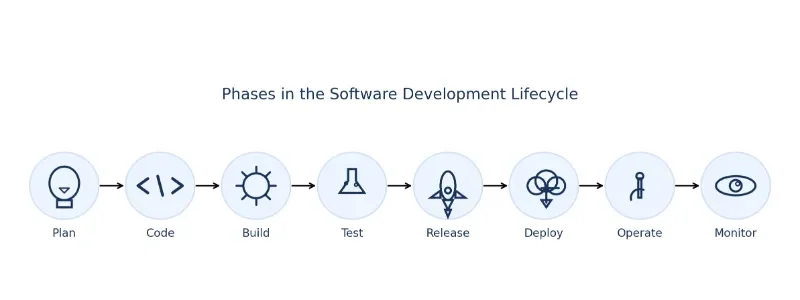
Horizontal diagram of the software development lifecycle (SDLC). Eight phases appear as labeled bubbles with simple icons: lightbulb—Plan, angle brackets—Code, gear—Build, flask—Test, rocket—Release, cloud download—Deploy, wrench—Operate, and eye—Monitor. Arrows connect each phase left-to-right to indicate flow and continuous iteration. Suitable as a hero illustration for software development, DevOps, CI/CD, testing, deployment, and observability content.
Table of Contents
Exploring Software Development – From Code to Production Systems
Software development is a coordinated process where programming, design, testing, and deployment work together to produce reliable systems. Each area below represents a key part of that lifecycle.
Programming Languages & Paradigms
Learn how different languages and programming styles shape problem-solving, from procedural and object-oriented to functional approaches.Software Architecture & Design
Understand how systems are structured using modules, layers, and design patterns to balance performance, scalability, and maintainability.Software Engineering
Explore development processes, teamwork, version control, and project workflows used to build real-world software systems.Software Testing & Quality Assurance
Learn how software is validated through unit, integration, and system testing to ensure reliability and prevent failures.Software Maintenance & Evolution
See how software continues to change after release through bug fixes, updates, and long-term improvements.HCI & User Experience (UX)
Connect software design with human behaviour through usability, accessibility, and interface design principles.Mobile Application Development
Build applications for mobile devices while managing constraints such as performance, battery usage, and connectivity.Embedded Systems & IoT Development
Develop software for hardware-constrained systems such as sensors, devices, and real-time environments.How do these areas work together in real systems?
Software development is not a sequence of isolated tasks. Programming, design, testing, and deployment operate together as a continuous system where changes must be integrated, validated, and monitored in real time.
A small code change may trigger automated tests, deployment pipelines, and monitoring alerts before reaching users.Software Development Lifecycle (SDLC) — From Code to Production
Software development follows a continuous lifecycle where code is planned, built, tested, deployed, and improved. In real systems, these stages are not strictly linear—they operate as an integrated workflow that allows teams to release and refine software safely.
How does software move from idea to a working system in practice?
Software moves through a lifecycle that includes requirements, design, implementation, testing, deployment, and maintenance. Modern development integrates these stages through automation and feedback loops, allowing systems to evolve continuously without breaking.
A small feature update may pass through automated tests, CI/CD pipelines, and monitoring systems before reaching users.Core Lifecycle Stages
- Requirements: defining what the system must achieve based on user and business needs
- Design: structuring the system using architecture, data models, and interfaces
- Implementation: writing code and building features based on the design
- Testing: validating functionality, reliability, and performance
- Deployment: releasing software into production environments
- Maintenance: fixing issues, improving performance, and adapting to new requirements
In modern systems, these stages are connected through continuous integration and deployment (CI/CD). This allows teams to release updates frequently while maintaining stability, making software development an ongoing process rather than a one-time project.
Core Practices in Modern Software Development
Modern software development relies on a set of practices that ensure systems remain reliable, scalable, and continuously improving. These practices connect development work with real-world deployment and operation.
How do teams ensure software works reliably after it is deployed?
Software reliability is achieved through automation, testing, monitoring, and controlled deployment. These practices reduce errors, detect issues early, and allow systems to evolve safely in production environments.
A code update may trigger automated tests, deployment pipelines, and monitoring checks before users ever see the change.Key Practices
- Version control: tracks changes, supports collaboration, and enables safe rollback of code
- Automated testing: verifies functionality through unit, integration, and system tests
- Continuous Integration (CI): merges and tests code changes frequently to detect issues early
- Continuous Deployment (CD): releases validated changes into production environments automatically
- Monitoring and observability: tracks system performance, errors, and user behaviour in real time
- Security integration: embeds security checks into development and deployment workflows
These practices work together as a system. Development is no longer separated from operations—software is continuously tested, deployed, and monitored to ensure stability while adapting to change.
These practices connect closely with cloud computing for deployment, cybersecurity for protection, and data analysis for monitoring and optimisation.
🛠️ Production Case Study: Architectural Implementation
Theory in Action: The Boson Title Search Engine
To demonstrate how core software engineering workflows, programmatic design patterns, and continuous testing strategies converge in production, our development pipeline built a custom, high-relevance search utility deployed directly on this platform. This software tool applies concrete development principles to solve active real-world constraints:
- Algorithmic Efficiency & Paradigms: Replaces computationally heavy database sweeps with optimized array operations, utilizing key-value lookup strategies to maintain
O(1)time complexity scaling. - Defensive Code & QA: Enforces data normalization pipelines using strict string cleaning algorithms and input sanitization to eliminate code injection vectors and prevent memory overhead vulnerabilities.
- System Evolution & Modularity: Built as a decoupled, pluggable core search engine framework featuring multi-tier algorithmic fallbacks and asynchronous UI state handling, ensuring stable future maintenance.
Challenges and Emerging Trends in Software Development
Software development involves balancing technical constraints, team coordination, and changing requirements. At the same time, new technologies are reshaping how systems are built and maintained.
What makes building and maintaining software difficult in real systems?
Software development is challenging because systems must remain reliable while continuously evolving. Teams must manage complexity, coordinate across roles, and ensure that new changes do not break existing functionality.
A new feature added to a system may unintentionally affect performance, security, or compatibility if not carefully tested.Key Challenges
- System complexity: managing large codebases with many interdependent components
- Changing requirements: adapting software as user needs and technologies evolve
- Team coordination: aligning developers, designers, and stakeholders
- Performance and scalability: ensuring systems handle increasing demand
- Security risks: protecting systems from vulnerabilities and attacks
How is software development changing with new technologies?
New tools and platforms are making development faster and more automated. Cloud infrastructure, AI-assisted coding, and continuous deployment allow teams to build, test, and release software more efficiently.
AI-assisted tools can generate code suggestions, while cloud platforms enable applications to scale automatically as usage grows.Emerging Trends
- AI-assisted development: using machine learning tools to support coding and testing
- Cloud-native systems: designing applications for scalable, distributed environments
- DevOps and automation: integrating development and operations through continuous workflows
- Microservices architecture: breaking systems into smaller, independent services
- Security integration: embedding security practices throughout the development lifecycle
Mini Workflow: From Code Change to Safe Release
Modern software changes move through automated pipelines before reaching users. This ensures that updates are tested, reviewed, and deployed safely.
- Create and review: small code changes are committed and reviewed through pull requests
- Automated testing: systems run tests and checks to detect errors early
- Preview deployment: temporary environments allow safe evaluation before release
- Gradual release: updates are rolled out to a small group of users first
- Monitoring and rollback: systems track performance and allow quick reversal if needed
This workflow allows teams to release updates frequently while maintaining stability.
Common Pitfalls in Software Development
Even well-designed systems can fail if development practices are not carefully managed. Recognising common pitfalls helps teams avoid costly mistakes.
- Large releases: shipping too much at once increases risk and makes failures harder to diagnose
- Unreliable tests: inconsistent results reduce trust in automated systems
- Exposed secrets: storing sensitive data in code creates serious security risks
- Lack of monitoring: issues remain undetected without logs and performance tracking
- Over-complex systems: unnecessary architecture increases maintenance difficulty
Good development practices focus on simplicity, automation, and early detection of issues.
Deployment Options — Choosing the Right Approach
Software systems are deployed in different ways depending on scale, performance, and operational needs. Each approach offers trade-offs between flexibility, control, and complexity.
| Option | Best for | Pros | Watch-outs |
|---|---|---|---|
| Containers on PaaS / K8s | Web APIs, services, scheduled jobs | Portability; autoscale; ecosystem | Ops overhead; resource limits & costs |
| Serverless (Functions) | Event-driven APIs, back-office tasks | No servers; scale-to-zero; per-use cost | Cold starts; time/memory limits; vendor quirks |
| Edge/Workers | Low-latency, simple request handlers | Global latency; built-in cache | Short compute; limited runtimes |
| Mobile (App Stores) | Android/iOS apps | Native UX; offline; device APIs | Review times; privacy; release process |
| Embedded/IoT (OTA) | Devices, sensors, controllers | Deterministic; hardware access | Memory/CPU limits; secure OTA updates |
Key Terms in Software Development
Software Lifecycle (SDLC): The process of designing, building, testing, deploying, and maintaining software systems.
Version Control: A system that tracks code changes and enables collaboration across developers.
CI/CD: Automated pipelines that test and deploy software continuously.
Deployment: The process of releasing software into a production environment.
Microservices: An architecture where systems are built as smaller, independent services.
Observability: Monitoring systems using logs, metrics, and traces to understand behaviour in real time.
How Software Development Connects Across the IT Ecosystem
Software development does not operate in isolation. It connects infrastructure, data systems, and user-facing applications into working digital services. Understanding these relationships helps you see how code becomes part of real-world systems.
Information Technology – Overview
See how software fits within the broader landscape of computing systems, networks, and digital infrastructure.Artificial Intelligence (AI)
Understand how software systems support intelligent models, automation, and decision-making processes.Cloud Computing
Learn how applications are deployed, scaled, and maintained using distributed cloud infrastructure.Cybersecurity
Explore how secure coding, testing, and deployment protect systems from vulnerabilities and attacks.Data Science & Analytics
See how software enables data pipelines, analysis workflows, and intelligent applications.Software Development
Understand the full lifecycle of building, testing, and maintaining production systems.Web Development
Learn how software is delivered through web platforms and interactive user interfaces.Networking & Telecommunication
Understand how systems communicate and exchange data across networks.Game Development
Explore how software combines logic, interaction, and design to create real-time experiences.Software Development — Bringing Systems Together
Software development is not just about writing code—it is about building systems that can evolve, scale, and remain reliable over time. From lifecycle workflows to deployment strategies, each part contributes to how software performs in real-world environments.
What does it mean to build software that works beyond the code?
Successful software integrates design, development, testing, deployment, and monitoring into a continuous system. It must remain stable while adapting to change, balancing speed with reliability. A small update released through automated pipelines can reach users safely while being monitored and rolled back if needed.
Understanding these connections helps students move beyond coding and toward building complete, production-ready systems.