
Networking and telecommunication form the invisible infrastructure that allows digital systems to communicate. From mobile devices and cloud platforms to industrial systems and real-time applications, data moves through networks governed by protocols, routing decisions, and physical transmission technologies.
How does data actually move between systems in real-world networks?
Data moves across networks as packets that are addressed, routed, and transmitted through interconnected devices such as switches, routers, and wireless systems. Protocols define how communication occurs, ensuring reliability, security, and efficient delivery across local and global networks.
A simple web request may travel through multiple routers, across networks, and back again before a page loads on your screen. This page helps you understand how communication systems operate—from addressing and routing to wireless transmission and large-scale infrastructure—so you can see how modern digital systems stay connected.
On the input side, students arrive with different starting points: some are curious about Wi-Fi and routers, others want cybersecurity, cloud networking, or mobile systems. At the same time, industry trends keep shifting—faster networks, new wireless standards, software-defined everything, and an ever-louder demand for reliability. These inputs ensure the curriculum does not drift into outdated trivia.
Controls give the learning process its backbone. Curriculum standards and academic policies define what “good” looks like: foundational concepts (addressing, routing, switching, radio basics), safe and ethical practice, and assessments that reward not just memorisation but correct reasoning. In networking, confidence without method can be expensive—so the controls encourage habits: verify assumptions, test systematically, document clearly, and design for resilience.
Mechanisms are where understanding becomes usable. With lab tools, simulators, configurations, and well-designed training resources, students learn to build networks, break them on purpose, and repair them intelligently. They practice reading logs, tracing packets, measuring performance, and diagnosing failures that hide behind “it works sometimes.” When the function is working well, the outputs speak for themselves: technicians who can keep systems running, and projects that demonstrate practical design, real troubleshooting skill, and an appreciation for how communication networks underpin modern life.
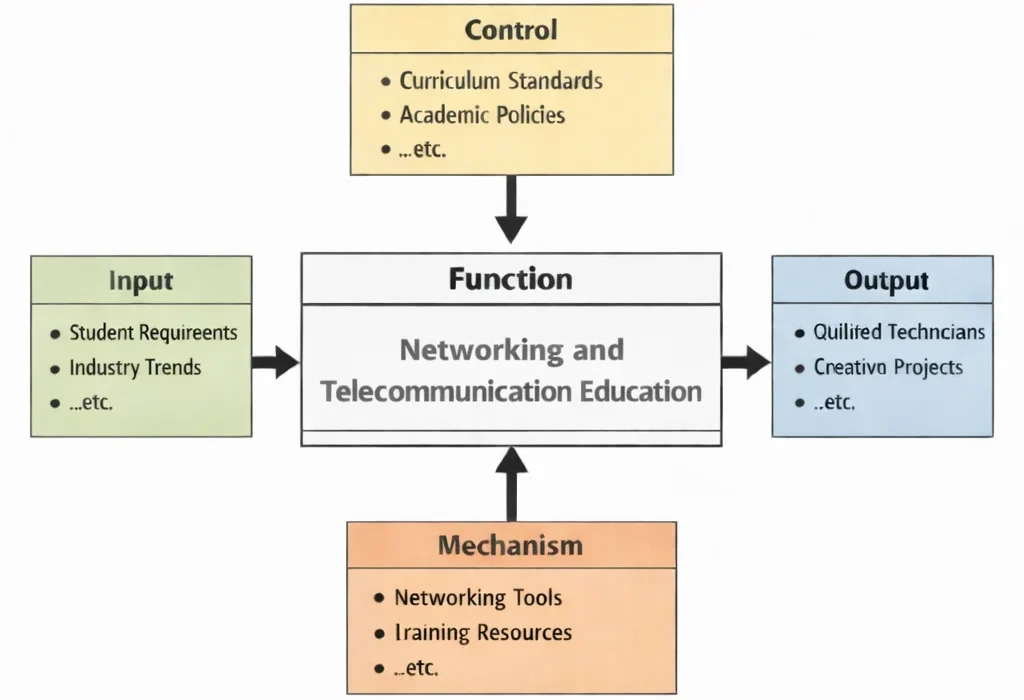
This IDEF0 diagram models “Networking and Telecommunication Education” as a structured transformation. Inputs such as student requirements and industry trends enter from the left, while controls—curriculum standards and academic policies—guide content, sequencing, assessment, and professional expectations from above. The central function produces outputs on the right, including qualified technicians and completed projects. The process is enabled by mechanisms from below, such as networking tools and training resources, which support hands-on configuration, testing, troubleshooting, documentation, and iterative skill-building.
Interactive Check: Intro & System Concepts
Verify your understanding of packet-switched networking, protocol encapsulation, and educational controls:
Introductory Concept Verification
1. Why is networking described as a system of “verify assumptions and test systematically”?
Answer: Network failures are rarely single-point errors; intermittent faults can stem from misconfigured subnets, DNS resolution failures, physical cable degradation, or firewall rule drops. Systematic Layer 1–7 isolation prevents costly misdiagnoses.
2. What constitutes the primary operational outputs of Networking and Telecommunication Education?
Answer: Qualified network engineers and practical infrastructure projects capable of maintaining uptime, troubleshooting routing faults, and configuring resilient communication systems.
Computer networking is how devices agree to talk: addressing, routing, name resolution, and rules that keep traffic orderly. This page gives you a practical path from zero to confident: what an IP packet looks like, how switches and routers differ, why DNS matters, and how the web’s request–response flow works. You’ll trace a packet across a small network, read a routing table, and see how latency, bandwidth, and loss shape user experience.
We keep the maths light and the practice real. Start by identifying your own IP and default gateway, then use common tools to test reachability and name resolution. Move on to subnets and CIDR, NAT vs public addressing, and the basics of secure transport. By the end, you’ll be able to sketch a small office/home network, explain each box’s job, and diagnose the most common failures with intent.
Why this matters. Digital networking and telecommunication underpin the global infrastructure that enables modern communication, data exchange, and online services. As society becomes increasingly connected, understanding the protocols, architecture, and security of these systems is critical.
Security foundations. In practice, fields such as network security and endpoint security keep networks fast and reliable while guarding against unauthorized access and data breaches. At the heart of secure networking lies cryptography, paired with identity and access management to authenticate users and protect resources. Organizations rely on formal cybersecurity policy to make these protections consistent.
Critical infrastructure. Networked systems are embedded in real-world operations via CPS security and operational technology (OT) security, supporting energy, transport, and manufacturing. When breaches occur, incident response and forensics teams trace the origin and impact so systems can recover and harden.
What’s changing. Emerging areas such as 5G security, quantum-safe encryption, and zero-trust networking are reshaping how we secure communication. Ethical hacking stress-tests systems proactively, while threat intelligence tracks global trends and anticipated risks.
Data & analytics for networks. Digital communication generates huge data streams. Data science & analytics help teams process and interpret them: from data analysis and big-data analytics to data cleaning & preprocessing. Clear data visualization surfaces anomalies and performance issues, while evolving tools & technologies improve monitoring and forecasting.
Ethics & society. Networking intersects with ethics and social issues—privacy, digital rights, equitable access, and misinformation. Sector-specific practice (see domain-specific analytics) ensures decisions make sense in context.
Interactive & real-time media. Principles of digital networking power experiences like game development, where multiplayer requires low latency and resilient servers. Technologies from game engine development pair with real-time APIs and server optimization, while VR/AR demand high-bandwidth links to synchronize spatial data across devices.
AI-driven communication. Modern platforms add intelligence—chatbots and NPCs draw on AI in games and thoughtful narrative design to deliver context-aware experiences. The fusion of cybersecurity, analytics, and interactive media is a rich area for innovation.

This illustration visualizes the scope of networking: core IP routing and switching at the base, wireless access and IoT at the edge, and secured, cloud-scale services tying everything together. Use it as a guide to move from fundamentals to real systems—addressing, VLANs, Wi-Fi, segmentation, and cloud/edge patterns.
Exploring Networking & Telecommunication — From Signals to Connected Systems
Networking and telecommunication form the communication layer of modern systems, enabling devices, applications, and services to exchange data reliably across local and global environments.
How do different networking components work together in real systems?
Modern networks combine physical transmission, protocols, infrastructure, and management systems to move data efficiently. Each area below represents a part of how communication systems are built, operated, and secured.
Networking & Telecommunication – Overview
See how devices communicate through addressing, routing, and protocols across interconnected systems.
Telecommunication Systems & Standards
Understand how large-scale communication systems operate using global standards and infrastructure.
Data Transmission & Communication Technologies
Learn how data is encoded, transmitted, and affected by bandwidth, noise, and signal behaviour.
Network Architecture & Protocols
Explore how layered systems and protocols coordinate communication across networks.
Network Management & Administration
Maintain and monitor networks through configuration, diagnostics, and performance tracking.
Network Security
Protect data in transit using encryption, firewalls, and secure communication protocols.
Cloud Networking
Connect distributed systems through virtual networks, load balancing, and scalable infrastructure.
Wireless & Mobile Communications
Enable connectivity through radio-based systems such as Wi-Fi, cellular networks, and IoT links.
Internet & Web Technologies
Understand how web services operate through DNS, HTTP, APIs, and content delivery systems.
Emerging Technologies
Explore new developments such as 5G, SDN, and next-generation communication systems.
How Data Travels: A Web Request in Action
When you open a web page, data moves across multiple systems in a sequence of coordinated steps. Understanding this flow helps you diagnose where problems occur in real networks.
What happens when you load a website?
A web request involves resolving a domain name, establishing a connection, securing communication, and exchanging data between client and server. Each step ensures that information reaches the correct destination reliably and securely.
A slow website may be caused by delays in DNS resolution, network latency, or server response time.
- DNS lookup: converts a domain name into an IP address
- Connection setup: establishes communication between client and server
- Secure exchange: encrypts data using protocols such as TLS
- Request and response: sends and receives web content
- Connection reuse: maintains efficiency for multiple requests
These steps occur in milliseconds, but each stage can introduce delays, making performance analysis a key part of networking.
Mini Exploration: Observing a Network Request
You can observe how a web request behaves using simple tools available on your device:
- Check DNS: identify how a domain maps to an IP address
- Trace path: observe how data travels across networks
- Inspect requests: use browser tools to view loading times and responses
Addressing and Subnets — Organising Networks
Networks use addressing systems to identify devices and organise communication. Understanding how addresses and subnets work helps explain how data is routed across systems.
How do networks identify and organise devices?
Each device on a network is assigned an IP address, which allows data to be sent and received. Subnets divide networks into smaller segments, improving organisation, performance, and control.
Devices within the same subnet communicate directly, while routers handle communication between different networks.
- IP addressing: identifies devices across local and global networks
- MAC addressing: identifies devices within a local network
- Subnets: divide networks into manageable segments
- Routing: directs data between different networks
- Network address translation (NAT): allows multiple devices to share a public IP
DNS — How Names Become Addresses
The Domain Name System (DNS) translates human-readable names into network addresses. It acts as the directory service of the internet, allowing users to access systems without remembering numerical IP addresses.
How does DNS connect a name to a real system?
When a user enters a domain name, a resolver queries a chain of DNS servers to find the corresponding IP address. The result is cached to improve performance, allowing future requests to be resolved more quickly.
A failed DNS lookup can prevent a website from loading even if the server itself is working correctly.
- Core records: A/AAAA (addresses), CNAME (alias), MX (mail routing), TXT (verification), NS (delegation)
- Caching and TTL: responses are stored temporarily to reduce repeated queries and improve speed
- Authority chain: queries move from root servers to domain-level servers to authoritative sources
- Common issues: stale caches, incorrect records, or misconfigured domains
DNS operates continuously in the background, enabling nearly all internet activity—from web browsing to email delivery—by ensuring that requests reach the correct destination. This system connects closely with web development and cybersecurity, where correct configuration and protection of DNS infrastructure are essential.
NAT, Firewalls, and Network Topologies — Controlling Data Flow
Modern networks control how data enters, leaves, and moves within systems. Technologies such as network address translation (NAT), firewalls, and structured network designs ensure that communication remains efficient, secure, and manageable.
How do networks control and protect data flow in real systems?
Networks use NAT to manage addressing, firewalls to control access, and structured topologies to organise communication. Together, these mechanisms ensure that systems can connect to external networks while maintaining security and stability.
A home network allows many devices to share one public IP address while preventing unwanted external access.
Core Concepts
- NAT (Network Address Translation): allows multiple internal devices to share a single public IP address while managing inbound and outbound connections
- Firewalls: filter network traffic based on rules, allowing only authorised communication while blocking unwanted access
- Stateful vs stateless filtering: some systems track ongoing connections, while others evaluate each packet independently
- Network segmentation: divides networks into smaller zones to improve performance and security
- Topologies: define how devices and systems are connected within a network
Common Network Structures
- Home and small office networks: router-based systems connecting devices through wired and wireless access
- Enterprise networks: segmented environments with multiple subnets and controlled access between departments
- Site-to-site connectivity: networks linked across locations using secure communication channels
- Public-facing systems: layered architectures with load balancing, security filtering, and distributed services
Common Pitfalls
- Incorrect routing: misconfigured gateways prevent data from reaching its destination
- Overly permissive rules: allowing unrestricted traffic increases security risk
- Poor segmentation: lack of isolation allows issues to spread across systems
- Configuration conflicts: overlapping rules or multiple routing paths create instability
This layer connects closely with cybersecurity, web development, and the broader information technology ecosystem, where secure and reliable communication is essential.
Wireless & Mobile Networking — Enabling Connectivity Without Wires
Wireless and mobile networks allow devices to communicate without physical connections, supporting mobility across homes, cities, and global infrastructure. These systems rely on radio signals, spectrum management, and network coordination to deliver reliable communication.
How do wireless systems maintain reliable communication in real environments?
Wireless networks depend on signal strength, interference control, and secure access to maintain performance. Technologies such as Wi-Fi and cellular networks balance coverage, speed, and reliability while adapting to changing environments.
A video call may degrade when signal strength drops or interference increases, even if the internet connection itself is stable.
Core Concepts
- Frequency bands: different ranges (e.g., 2.4 GHz, 5 GHz, 6 GHz) affect coverage, speed, and interference
- Signal quality: stronger signals and lower noise improve stability and throughput
- Roaming: devices move between access points while maintaining connectivity
- Security: authentication and encryption protect wireless communication
- Interference: overlapping signals and environmental factors affect performance
Common Wireless Systems
- Wi-Fi networks: local connectivity within homes, offices, and public spaces
- Cellular networks (4G/5G): wide-area connectivity managed by carriers
- Mobile hotspots: portable connections for temporary or remote access
Wireless networking extends communication beyond fixed infrastructure, enabling mobile applications, IoT systems, and real-time services across diverse environments. This area connects closely with network security, where performance and protection must be balanced.
Network Performance — Latency, Throughput, and Reliability
The quality of a network is determined not just by speed, but by how quickly, reliably, and consistently data moves between systems. Performance depends on multiple interacting factors that affect user experience in real applications.
What determines whether a network feels fast and reliable?
Network performance depends on latency (delay), throughput (data rate), packet loss (reliability), and jitter (consistency). These factors combine to shape how applications behave, especially for real-time and data-intensive services.
A video stream may buffer not because bandwidth is low, but because latency fluctuates or packets are lost during transmission.
Core Performance Factors
- Latency: the time taken for data to travel between systems, affecting responsiveness
- Throughput: the effective rate at which usable data is delivered, not just theoretical bandwidth
- Packet loss: missing data that must be retransmitted, reducing efficiency
- Jitter: variation in delay, which affects real-time applications such as voice and video
What Influences Network Performance?
- Distance and routing: longer paths and inefficient routing increase delay
- Network congestion: competing traffic reduces available capacity
- Signal quality: poor wireless conditions increase errors and retransmissions
- Protocol behaviour: transport and security protocols affect how data is transmitted
- System design: server location, content delivery networks, and caching strategies influence performance
Troubleshooting Networks — Diagnosing Problems Systematically
Network issues are best solved by working through systems step by step. Rather than guessing, effective troubleshooting isolates the problem by checking each layer of the network in a logical sequence.
How can network problems be identified efficiently in real systems?
Effective troubleshooting involves isolating whether the issue lies with the device, the local network, or external systems. By testing each layer in sequence, problems can be narrowed down quickly and resolved with minimal disruption.
A connection issue may appear as a “website not loading,” but the actual cause could be a local Wi-Fi problem, incorrect addressing, or a remote server failure.
Systematic Troubleshooting Approach
- Local connection: confirm that the device is properly connected through cable or wireless network
- Address configuration: check that the device has valid network addressing and can communicate within its local segment
- Gateway access: verify that the device can reach its immediate network gateway
- Name resolution: determine whether the issue is related to translating domain names into addresses
- Routing path: assess whether data can reach external networks and return successfully
- Service availability: confirm that the destination system is running and accepting connections
- System changes: identify recent updates or configuration changes that may have introduced issues
History, Challenges, and Future of Networking and Telecommunication
History and Evolution of Telecommunication and Networks
Networking began with electrical telegraphy and point-to-point voice telephony in the 19th and early 20th centuries. The computing revolution birthed packet switching in the late 1960s with ARPANET, replacing circuit-switched telephone lines with decentralized data chunking. The 1970s and 1980s saw the standardization of the TCP/IP protocol suite and Ethernet, linking local area networks (LANs) into global internetworks. The 1990s introduced commercial fiber-optic backbones, digital subscriber lines (DSL), and the World Wide Web. Over the last two decades, networking shifted toward high-speed wireless (4G/5G), optical core switching, Software-Defined Networking (SDN), and hyperscale cloud infrastructure.
Current Technical & Operational Challenges
Modern network engineering faces severe architectural and physical constraints:
- Shannon-Hartley Spectral Limits: Physical wireless spectrum faces theoretical throughput caps; overcoming noise floor constraints requires complex multi-antenna arrays (Massive MIMO).
- BGP Routing Vulnerabilities & Hijacking: The internet’s global core routing protocol (Border Gateway Protocol) lacks intrinsic cryptographic authentication, exposing paths to route spoofing and interception.
- Zero-Trust Inspection Latency Overhead: Deep-packet inspection (DPI) and real-time TLS decryption at line rate strain hardware performance at enterprise perimeters.
- IPv4 Exhaustion & Legacy IPv6 Migration: Managing NAT CGNAT (Carrier-Grade NAT) middleboxes while running dual-stack transition networks creates configuration friction and security blindspots.
Future Potentials & Emerging Paradigms
Telecommunication infrastructure is evolving toward autonomous, software-defined, and quantum-secured horizons:
- 6G Terahertz (THz) Communication: Utilizing sub-millimeter waves to achieve terabit-per-second wireless throughput and sub-millisecond air-interface latency.
- Quantum Key Distribution (QKD) & Post-Quantum Networks: Securing optical backbones against quantum-computer decryption using physics-based photon entanglement verification.
- Intent-Based AI Self-Healing Networks: Machine learning agents dynamically rerouting traffic, optimizing spectral allocation, and auto-remediating DDoS anomalies without human intervention.
- Low Earth Orbit (LEO) Satellite Mesh Constellations: Inter-satellite laser links providing low-latency global coverage directly bypassing terrestrial backhauls.
Where Networking Operates in Real Systems
Networking is embedded across nearly every modern system, enabling communication between devices, services, and users. Its role varies depending on the environment, but always centres on reliable and efficient data exchange.
Where does networking play a critical role in real-world applications?
Networking supports everything from enterprise systems and cloud platforms to telecommunications and connected devices. It enables data to move between systems while maintaining performance, security, and reliability.
- Enterprise IT: manages internal networks to ensure reliable access, segmentation, and system availability
- Cloud computing: connects distributed services using virtual networks, load balancing, and secure communication
- Telecommunication systems: operate large-scale networks that deliver voice, data, and media services
- Cybersecurity: protects data in transit through monitoring, filtering, and secure access control
- IoT and cyber-physical systems: enable real-time communication between sensors, devices, and control systems
Interactive Quick Review: Core Protocol Concepts
Reinforce key concepts regarding packet headers, Layer 2 vs. Layer 3 forwarding, and DNS lookup behavior before reading the FAQ:
Quick Review Verification
1. How does Layer 2 Ethernet switching differ fundamentally from Layer 3 IP routing?
Answer: Layer 2 switching forwards Ethernet frames within a single local broadcast domain (subnet) using hardware MAC address tables. Layer 3 routing forwards IP packets between different subnets across global networks using routing tables.
2. What is the role of Network Address Translation (NAT) in modern network architecture?
Answer: NAT maps multiple private, non-routable internal IP addresses (e.g., 192.168.x.x) to a single public IP address at the perimeter router, conserving IPv4 space and shielding internal hosts from direct internet exposure.
FAQ
What should I learn first in networking?
Start with IP addressing and subnets, then DNS lookups, routing tables, and the HTTP request flow. With those four, most troubleshooting makes sense.
How do I tell if a problem is DNS or connectivity?
Ping your gateway → ping a public IP (
8.8.8.8) → resolve a name (nslookup prep4uni.online). If IP works but names fail, it’s DNS.What’s the difference between switching and routing?
Switching (L2) forwards frames inside a subnet using MAC tables; routing (L3) forwards packets between subnets using a routing table. Inter-VLAN traffic requires routing.
What’s NAT, and when do I need port forwarding?
NAT lets many private hosts share one public IP. Port forwarding (DNAT) maps a public port to an internal host so external clients can reach your service.
What Wi-Fi signal is “good”?
Aim for RSSI ≥ −65 dBm and SNR ≥ 25 dB for calls/video. Prefer 5 GHz with sensible channel width; on 2.4 GHz stick to channels 1/6/11.
My internet feels slow—what should I check first?
Baseline latency to the gateway, channel/SNR on Wi-Fi, packet loss & jitter, MTU/MSS (tunnels/VPNs), and server distance. Wired tests help isolate Wi-Fi issues.
Key Terms in Networking
- IP address
- A unique identifier that allows devices to communicate across networks.
- MAC address
- A hardware-level identifier used to recognise devices within a local network.
- Subnet
- A division of a network into smaller segments to improve organisation and performance.
- Default gateway
- The device that connects a local network to external networks.
- DNS (Domain Name System)
- A system that translates domain names into network addresses.
- TTL (Time-to-Live)
- The duration for which DNS information is stored before being refreshed.
- VLAN
- A method of separating a network into multiple logical segments for control and security.
- NAT (Network Address Translation)
- A technique that allows multiple devices to share a single public network address.
- Latency
- The delay in transmitting data between systems.
- Throughput
- The rate at which data is successfully delivered across a network.
- Packet loss
- The percentage of data packets that fail to reach their destination.
- TLS / HTTPS
- Protocols that secure communication through encryption.
- TCP and UDP
- Transport protocols used for reliable or fast data transmission.
Further Reading
These resources help you deepen your understanding of networking systems, from foundational concepts to practical implementation:
- Computer Networks: A Systems Approach — A clear, system-level explanation of how modern networks operate.
- Stanford CS144: Intro to Computer Networking — Structured lectures and practical exercises that connect theory with real systems.
- Beej’s Guide to Network Programming — A practical introduction to how applications communicate over networks.
- Practical Networking: Subnetting & CIDR Guides — Hands-on guides to understanding network addressing and segmentation.
Networking & Telecommunication — Bringing Systems Together
Networking and telecommunication form the communication backbone of modern digital systems. From addressing and routing to wireless connectivity and performance, each component contributes to how data moves reliably across environments.
What does it mean to understand networking as a system?
Understanding networking means seeing how data is addressed, transmitted, routed, secured, and delivered across interconnected systems. These processes operate together continuously, allowing applications and services to function in real time.
By connecting concepts such as DNS, routing, performance, and wireless communication, you move beyond isolated topics and begin to understand how complete systems operate. This perspective is essential for further study in cloud computing, cybersecurity, and large-scale distributed systems.
How Networking Connects the IT Ecosystem
Networking and telecommunication provide the communication layer that allows systems, applications, and services to exchange data. Every area of information technology depends on reliable connectivity to function in real-world environments.
Information Technology – Overview
See how networking supports the broader structure of computing systems and digital infrastructure.
Artificial Intelligence (AI)
Enable intelligent systems by transporting data between models, services, and users.
Cloud Computing
Connect distributed servers and services through scalable network infrastructure.
Cybersecurity
Protect communication channels and data flows across networks from threats and attacks.
Data Science & Analytics
Move and process data across systems for analysis, monitoring, and decision-making.
Software Development
Deploy and operate applications across networked environments and connected systems.
Web Development
Deliver web applications through client–server communication and internet protocols.
Networking & Telecommunication
Focus on how data is transmitted, routed, and managed across local and global networks.
Game Development
Support real-time multiplayer systems through low-latency communication and data synchronisation.
🎯 Career Guidance Tool
Is Networking & Telecoms Right For You?
Explore career pathways, check your fit, and assess your skills — before you commit to a degree.
End-of-Page Exercises: Review, Systems & Analytics
Networking — Key Review Questions and Answers
1. Why is networking essential in modern systems?
Answer: Networking enables devices and systems to communicate, allowing data, services, and applications to function across local and global environments.
2. What are the core components of a network?
Answer: Networks consist of devices (routers, switches), communication links (copper, fiber, wireless), and protocols that manage how data is transmitted, addressed, and received.
3. What role do protocols play?
Answer: Protocols define how data is formatted, transmitted, and interpreted, ensuring reliable communication between systems regardless of underlying hardware.
4. What is the difference between routing and switching?
Answer: Switching connects devices within a local network (Layer 2 MAC forwarding), while routing connects different networks together (Layer 3 IP packet forwarding).
5. Why is wireless networking important?
Answer: Wireless systems enable mobility and flexible connectivity, supporting modern applications such as mobile devices, smart cities, and IoT sensor deployments.
6. How does security support networking?
Answer: Security protects data in transit through encryption, authentication, access control, and firewalls, ensuring privacy, integrity, and reliable communication.
Thinking Deeper — Systems and Trade-Offs
1. Why can increasing bandwidth alone fail to improve performance?
Answer: Because high latency, high packet loss, TCP window bottlenecks, or poor DNS response times can throttle real-time interactive traffic even when excess bandwidth capacity is available.
2. How does network design influence system reliability?
Answer: Redundant link topologies, dynamic routing protocols (OSPF/BGP), load balancing, and network segmentation dictate whether traffic automatically reroutes during hardware failures.
3. Why is security tightly linked to networking design?
Answer: Because physical and logical path topologies determine exposure to eavesdropping, unauthorized access, and lateral movement during security breaches.
4. How does scaling a network change its behaviour?
Answer: Larger networks increase broadcast domain noise, routing table sizes, and convergence times, requiring hierarchical VLANs, aggregation routers, and automated management.
5. What trade-offs exist between performance and security?
Answer: Deep packet inspection, TLS decryption, and multi-hop VPN tunnels introduce latency and processing overhead, whereas prioritizing raw throughput limits security filtering.
6. How will emerging technologies reshape networking?
Answer: Technologies like 5G/6G millimeter wave, Software-Defined Networking (SDN), and edge computing shift network control into programmable software layers while moving processing closer to the user.
Numerical Engineering Problems & Solutions
Problem 1: Transmission Time Calculation over Fiber Link
Calculate the transmission time (in milliseconds) for a 1,500-byte IP packet over a 100 Mbps Ethernet link. (Note: 1 byte = 8 bits; 1 Mbps = 1,000,000 bits/sec).
Calculate the transmission time (in milliseconds) for a 1,500-byte IP packet over a 100 Mbps Ethernet link. (Note: 1 byte = 8 bits; 1 Mbps = 1,000,000 bits/sec).
Solution:
- Convert packet size to bits: 1,500 bytes × 8 = 12,000 bits
- Transmission time = Packet size in bits ÷ Link bandwidth
- Time = 12,000 bits ÷ 100,000,000 bits/sec = 0.00012 seconds
- Convert to milliseconds: 0.00012 × 1,000 = 0.12 ms
Problem 2: IPv4 Subnet Host Capacity Calculation
An administrator creates an IPv4 subnet using a
An administrator creates an IPv4 subnet using a
/26 prefix (mask 255.255.255.192). Calculate the total IP addresses, network/broadcast reserved addresses, and usable host addresses.Solution:
- Host bits = 32 – 26 = 6 host bits
- Total IP addresses = 26 = 64 addresses
- Reserved addresses = 2 (1 network ID + 1 broadcast address)
- Usable host capacity = 64 – 2 = 62 hosts
Problem 3: Propagation Delay Across Optical Fiber
A fiber-optic link connects two datacenters separated by a distance of 1,000 km. Assuming light travels through glass fiber at a propagation speed of 2.0 × 10⁸ m/s, calculate the one-way propagation delay in milliseconds.
A fiber-optic link connects two datacenters separated by a distance of 1,000 km. Assuming light travels through glass fiber at a propagation speed of 2.0 × 10⁸ m/s, calculate the one-way propagation delay in milliseconds.
Solution:
- Distance = 1,000 km = 1,000,000 meters (1.0 × 10⁶ m)
- Propagation delay = Distance ÷ Propagation speed
- Delay = 1,000,000 m ÷ 200,000,000 m/s = 0.005 seconds
- Convert to milliseconds: 0.005 × 1,000 = 5.0 ms
Problem 4: Bandwidth-Delay Product (BDP) Calculation
Calculate the Bandwidth-Delay Product (BDP) in bytes for a link with 1 Gbps bandwidth (109 bits/sec) and a Round-Trip Time (RTT) of 40 milliseconds.
Calculate the Bandwidth-Delay Product (BDP) in bytes for a link with 1 Gbps bandwidth (109 bits/sec) and a Round-Trip Time (RTT) of 40 milliseconds.
Solution:
- Convert RTT to seconds: 40 ms = 0.040 seconds
- BDP in bits = Bandwidth × RTT = 1,000,000,000 bits/sec × 0.040 sec = 40,000,000 bits
- Convert BDP to bytes: 40,000,000 ÷ 8 = 5,000,000 bytes (5 MB)
Problem 5: Effective Throughput Under Packet Loss
A 100 Mbps TCP link experiences a 2% packet loss rate. If a selective retransmission model reduces effective throughput by a factor of (1 – Loss Rate)2, calculate the net effective throughput in Mbps.
A 100 Mbps TCP link experiences a 2% packet loss rate. If a selective retransmission model reduces effective throughput by a factor of (1 – Loss Rate)2, calculate the net effective throughput in Mbps.
Solution:
- Loss rate = 2% = 0.02
- Efficiency factor = (1 – 0.02)2 = (0.98)2 = 0.9604
- Net throughput = 100 Mbps × 0.9604 = 96.04 Mbps
Problem 6: Signal-to-Noise Ratio (SNR) Conversion to Decibels
A Wi-Fi receiver measures a signal power of 10-6 Watts and an environmental noise power of 10-9 Watts. Calculate the SNR as an absolute ratio and convert it to decibels (dB) using SNRdB = 10 × log10(Ratio).
A Wi-Fi receiver measures a signal power of 10-6 Watts and an environmental noise power of 10-9 Watts. Calculate the SNR as an absolute ratio and convert it to decibels (dB) using SNRdB = 10 × log10(Ratio).
Solution:
- SNR Ratio = Signal Power ÷ Noise Power = 10-6 ÷ 10-9 = 1,000
- SNR in dB = 10 × log10(1,000)
- Since log10(1,000) = 3: SNRdB = 10 × 3 = 30 dB
Problem 7: Shannon Channel Capacity Limit
A wireless channel has a bandwidth of 20 MHz (20 × 106 Hz) and an SNR ratio of 15. Calculate the maximum theoretical channel capacity in Mbps using Shannon’s Law: C = B × log2(1 + SNR). (Note: log2(16) = 4).
A wireless channel has a bandwidth of 20 MHz (20 × 106 Hz) and an SNR ratio of 15. Calculate the maximum theoretical channel capacity in Mbps using Shannon’s Law: C = B × log2(1 + SNR). (Note: log2(16) = 4).
Solution:
- 1 + SNR = 1 + 15 = 16
- log2(16) = 4
- Capacity C = 20 × 106 Hz × 4 = 80,000,000 bits/sec
- Convert to Mbps = 80 Mbps
Problem 8: Wi-Fi Airtime Utilization & Throughput Allocation
An 802.11ac Access Point serves 4 identical smartphones. If client 1 consumes 40% airtime, client 2 consumes 20%, client 3 consumes 20%, calculate the remaining airtime percentage available for client 4 and its throughput if total raw capacity is 200 Mbps.
An 802.11ac Access Point serves 4 identical smartphones. If client 1 consumes 40% airtime, client 2 consumes 20%, client 3 consumes 20%, calculate the remaining airtime percentage available for client 4 and its throughput if total raw capacity is 200 Mbps.
Solution:
- Used airtime = 40% + 20% + 20% = 80%
- Remaining airtime for Client 4 = 100% – 80% = 20%
- Client 4 throughput = 200 Mbps × 0.20 = 40 Mbps
Problem 9: CIDR Aggregation Supernetting
An ISP aggregates four contiguous
An ISP aggregates four contiguous
/24 subnets: 192.168.0.0/24, 192.168.1.0/24, 192.168.2.0/24, and 192.168.3.0/24. Calculate the aggregated CIDR supernet prefix and total usable IPs across the block.Solution:
- Combining 4 contiguous
/24blocks requires subtracting 2 bits from the prefix: 24 – 2 = 22 - Aggregated CIDR block =
192.168.0.0/22 - Host bits = 32 – 22 = 10 host bits
- Usable IPs = 210 – 2 = 1,024 – 2 = 1,022 usable hosts
192.168.0.0/22, containing 1,022 usable IP addresses.Problem 10: Router Queue Delay & Buffer Overflow Metrics
A router buffer holds up to 100 packets. Packets arrive at 12,000 packets/sec and the egress interface transmits 10,000 packets/sec. Calculate the buffer fill rate per second, time to buffer exhaustion starting from empty, and packet loss rate per second once full.
A router buffer holds up to 100 packets. Packets arrive at 12,000 packets/sec and the egress interface transmits 10,000 packets/sec. Calculate the buffer fill rate per second, time to buffer exhaustion starting from empty, and packet loss rate per second once full.
Solution:
- Net buffer accumulation rate = 12,000 – 10,000 = 2,000 packets/sec
- Time to fill 100-packet buffer = 100 ÷ 2,000 = 0.05 seconds (50 ms)
- Packet loss rate once full = 2,000 dropped packets/sec
Problem 11: HTTP/2 Multiplexing Overhead Savings
A web page requires fetching 50 small images (10 KB each). Under HTTP/1.1 without pipelining, each request requires a 3-way TCP handshake (RTT = 20 ms). Under HTTP/2 multiplexing, all requests share 1 TCP connection. Calculate handshake latency saved in milliseconds.
A web page requires fetching 50 small images (10 KB each). Under HTTP/1.1 without pipelining, each request requires a 3-way TCP handshake (RTT = 20 ms). Under HTTP/2 multiplexing, all requests share 1 TCP connection. Calculate handshake latency saved in milliseconds.
Solution:
- HTTP/1.1 handshake overhead = 50 connections × 20 ms RTT = 1,000 ms
- HTTP/2 multiplexed overhead = 1 connection × 20 ms RTT = 20 ms
- Latency saved = 1,000 ms – 20 ms = 980 ms
Problem 12: DNS TTL Cache Expiration and Query Volume
A web service receives 10,000 domain resolution requests per hour from a resolver. If DNS TTL is set to 300 seconds (5 minutes), calculate maximum external authoritative DNS queries made per hour assuming continuous active requests.
A web service receives 10,000 domain resolution requests per hour from a resolver. If DNS TTL is set to 300 seconds (5 minutes), calculate maximum external authoritative DNS queries made per hour assuming continuous active requests.
Solution:
- TTL duration = 5 minutes
- Cache refreshes required per hour = 60 minutes ÷ 5 minutes = 12 refreshes
- External authoritative queries = 12 queries per hour (remaining 9,988 requests served from cache)
Networking and Telecommunication — Summary & Wrap-Up
Networking and telecommunication form the essential, high-availability digital highway powering global systems. By mastering IP addressing, subnetting, DNS resolution, routing protocols, firewalls, and wireless spectrum management, network engineers construct resilient, secure, and performant communication architectures that sustain modern information technology.