
Virtualization and Containerization Education is essentially an education in invisible architecture—the layers that let many workloads live on the same hardware without tripping over one another. The diagram shows the process plainly: learners begin with inputs such as foundational computing knowledge and structured materials, then learn under controls that mimic real-world constraints—policies, quotas, and resource limits that force clear thinking instead of “just add more hardware.” With mechanisms like guided labs and expert instruction, students practice the two mindsets side by side: virtualization as full-machine abstraction (strong isolation, heavier footprint), and containerization as application-focused packaging (lightweight, portable, fast to replicate). The output is a practical confidence: learners can decide when a VM is the right boundary, when containers are the right tool, how to allocate resources wisely, and how to build environments that are consistent across development, testing, and deployment—so “it works on my machine” becomes an avoidable phrase rather than a recurring tragedy.
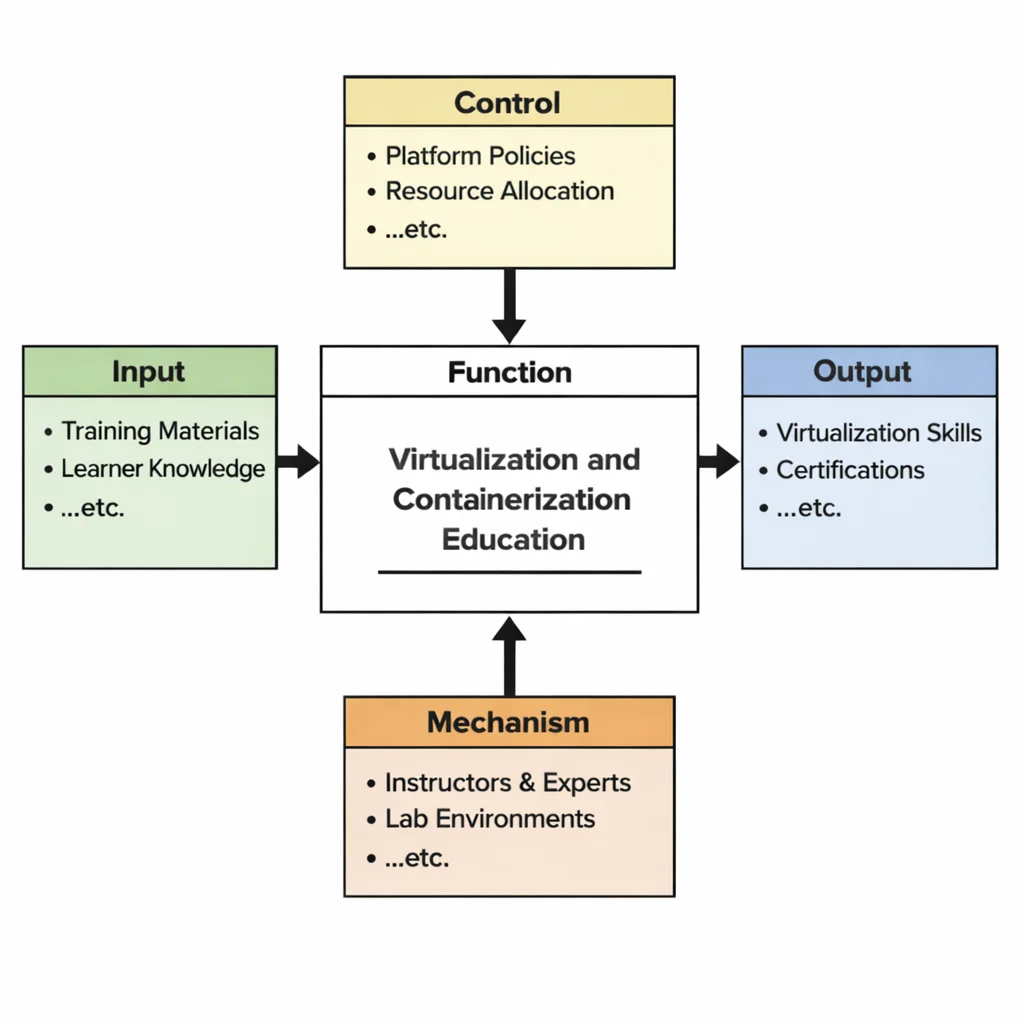
This IDEF0 (Input–Control–Output–Mechanism) diagram presents Virtualization and Containerization Education as a structured transformation. Inputs include training materials and baseline learner knowledge. Controls such as platform policies, resource allocation limits, and operational constraints guide how virtual machines and containers are configured, secured, and evaluated. Mechanisms—experienced instructors, lab environments, and tooling—enable learners to practice building repeatable environments, managing images, allocating CPU/memory/storage, and understanding isolation. Outputs include learners who can explain and apply virtualization and containerization concepts, compare trade-offs, and use these approaches to build portable, efficient, and manageable computing environments.
Virtualization and containerization are fundamental to modern cloud architecture, enabling efficient resource allocation, consistent deployment, and scalable applications. Virtualization abstracts hardware resources to create multiple virtual machines, each running its own operating system, while containerization packages applications with their dependencies in lightweight, portable containers. These technologies form the backbone of DevOps and Infrastructure as Code practices, streamlining automation across development pipelines.
In dynamic environments like edge computing, containerization offers rapid deployment and minimal footprint, ideal for devices with limited resources. Both virtualization and containers contribute significantly to performance tuning and scalability, ensuring that applications can handle variable loads while maintaining high availability. Optimizing networking layers is also key, and these technologies are tightly integrated with advanced networking and connectivity in the cloud protocols.
Security remains a top concern. Isolating applications within containers provides an extra layer of protection, but also introduces new attack surfaces. This requires attention to security, compliance, and identity management. Integrating these systems with broader cybersecurity strategies ensures that images, networks, and runtimes remain secure across all layers. In high-risk environments, specific measures like endpoint protection and network security become crucial.
When deploying serverless architectures like Functions-as-a-Service (FaaS), containers are often used under the hood to isolate workloads. This enables efficient autoscaling and seamless deployment while supporting specialized workloads such as data analytics and big data processing. The same agility benefits container orchestration tools like Kubernetes, enabling sophisticated scheduling, load balancing, and resilience features.
The ability to isolate workloads also facilitates compliance with cybersecurity policy requirements and supports secure auditing through incident forensics. Moreover, containers are integral to managing secure authentication via identity and access management tools, allowing fine-grained permission controls across distributed systems.
Emerging challenges have prompted advances in tools for threat intelligence, AI-driven monitoring, and even ethical hacking to proactively assess vulnerabilities in virtualized and containerized environments. Encryption techniques from cryptography also ensure secure communication between containerized services.
In domains like Operational Technology (OT) and cyber-physical systems, containerization enables isolated, manageable application updates in real-time systems. The rise of specialized workloads has led to emerging cybersecurity approaches that align with containerized deployment models. These are reinforced by widespread initiatives promoting cybersecurity awareness and continuous auditing in production.
As organizations adopt hybrid and multi-cloud strategies, containers facilitate seamless movement across providers. In turn, emerging technologies continue to push the boundaries of what’s possible in modular, agile deployments. Virtualization and containerization will remain pivotal for students and professionals preparing to design and manage scalable, secure, and efficient cloud-native systems.

This image visualizes modern infrastructure as layered and modular. Two stylized clouds hover overhead, sending vertical “data rain” into a data-center scene where server racks represent pooled physical resources. To the right, neatly stacked, brightly colored blocks resemble container images or packaged services—compact units that can be moved, replicated, and orchestrated. The contrast between the structured server rows and the modular block stacks suggests the shift from virtual machines (virtualized hardware environments) to containers (lightweight, portable application environments). The glowing lines and flowing streams reinforce the idea of rapid provisioning, elastic scaling, and efficient resource sharing across cloud platforms and on-prem systems.
Building Cloud Systems: Resource Abstraction Navigation
Discover how virtualization hypervisors and container runtimes decouple application workloads from underlying physical hardware across the Cloud Computing cluster. Each card details hardware emulation, OS kernel sharing, container orchestration, and workload portability.
Cloud Systems Overview
Presents the overall macro architectural framework, detailing how bare-metal server hardware is abstracted into elastic compute pools.
Layers of Cloud Services
Examines hypervisor-managed Virtual Machines in IaaS, containerized application runtimes in PaaS, and multi-tenant software instances in SaaS.
Deployment Strategies
Explores workload migration, moving containerized application images seamlessly across private data centers, public cloud regions, and hybrid environments.
Data in Distributed Systems
Details virtual machine disk formats (.qcow2, .vmdk), Kubernetes Container Storage Interfaces (CSI), and stateful persistent volume claims (PVC).
Resource Abstraction
Focuses on Type-1/Type-2 Hypervisors (VMware ESXi, KVM), OS-level container isolation (Docker, containerd), and cluster orchestration engines (Kubernetes).
Automated Delivery Systems
Covers building container images within CI pipelines, pushing images to private registries, and executing declarative GitOps deployments via Helm charts.
Cloud Connectivity
Details virtual network interfaces (vNICs), software bridges, and Container Network Interface (CNI) overlay plugins (Calico, Cilium, Flannel) in Kubernetes clusters.
Scaling & Reliability
Analyzes Kubernetes Horizontal Pod Autoscaling (HPA), rapid container startup times, node affinity, and self-healing container restart policies.
Trust & Governance
Enforces container image vulnerability scanning, non-root user execution flags, Linux kernel namespaces/cgroups, and Kubernetes Role-Based Access Control (RBAC).
Serverless Execution
Explores micro-VM isolation engines (AWS Firecracker) that spin up lightweight Linux execution sandboxes in under 5ms for serverless function calls.
Edge & Distributed Futures
Examines deploying lightweight Kubernetes distributions (K3s, MicroK8s) onto resource-constrained IoT gateways and 5G edge computing nodes.
Architectural Comparison: Virtual Machines vs. Containers
Modern cloud infrastructure relies on two distinct abstraction models to maximize physical hardware density and operational agility:
- Virtualization (Hardware Abstraction):
- Hypervisors: Software layers (Type-1 bare-metal like VMware ESXi/KVM, or Type-2 hosted like VirtualBox) that abstract physical CPU, RAM, disk, and network hardware into Virtual Machines (VMs).
- Full Guest OS: Each VM packages a complete guest operating system kernel, device drivers, and binaries alongside application software.
- Key Capabilities: Maximum hardware security isolation, support for heterogeneous operating systems (running Linux and Windows side-by-side on one host), and full VM snapshots.
- Containerization (Operating System Abstraction):
- Shared Kernel Engine: Container runtimes (Docker, containerd) package applications with user-space dependencies, execution binaries, and config files while sharing the host OS Linux kernel.
- Isolation Mechanisms: Utilizes Linux kernel namespaces (for process/network isolation) and cgroups (control groups for CPU/memory resource limits).
- Key Capabilities: Sub-second startup times, lightweight megabyte-scale image sizes, high container density per host, and guaranteed application portability across environments.
- Container Orchestration at Scale (Kubernetes):
- Automates container scheduling, load balancing, health monitoring, self-healing container replacement, rolling software updates, and secret management across large clusters of worker nodes.
Why Study Virtualization and Containerization
Mastering resource abstraction technologies equips software developers and systems architects with foundational cloud skills:
- Eliminating “It Works on My Machine”: Containerizing applications guarantees that code behaves identically on developer laptops, staging servers, and cloud production environments.
- Foundation of Cloud-Native Architecture: Microservices, Kubernetes orchestration, serverless micro-VMs, and CI/CD automation pipelines rely directly on containerized units of execution.
- Resource Efficiency & Cost Savings: Teaches engineers how to maximize physical hardware server density, reducing overall cloud compute billing and energy draw.
Engineering FAQs: Virtualization & Containerization
What is Virtualization in cloud computing?
Virtualization is the technology enabling a single physical server to be partitioned into multiple virtual machines (VMs). A software layer called a hypervisor abstracts physical hardware, allowing each VM to run an independent guest operating system.
How does Containerization differ from traditional Virtualization?
Virtual machines virtualize physical hardware, requiring each VM to run a heavy guest OS. Containers virtualize the operating system kernel, sharing the host OS kernel among lightweight isolated containers, resulting in faster startup speeds and lower RAM overhead.
What is the difference between a Type-1 and Type-2 Hypervisor?
Type-1 hypervisors (“bare-metal” e.g., VMware ESXi, KVM) install directly on bare physical host hardware, delivering high performance for enterprise data centers. Type-2 hypervisors (“hosted” e.g., VirtualBox) install on top of an existing host OS, used primarily for local testing.
What role does Kubernetes play in containerized environments?
Kubernetes is an open-source container orchestration engine that automates deploying, scaling, networking, load balancing, and self-healing for containerized workloads across clusters of multi-node cloud servers.
Can virtual machines and containers be used together in cloud systems?
Yes. In most public clouds, container orchestration nodes (Kubernetes worker nodes) run inside virtual machines (IaaS instances). VMs supply underlying infrastructure security boundaries, while containers host modular microservices on top.
Interactive Review & Problem Solving
Review Questions & Answers
1. What is virtualization and how does it work in cloud computing?
Answer: Virtualization abstracts physical server hardware into software components. A hypervisor intercepts hardware calls, creating isolated Virtual Machines (VMs) with virtual CPUs, RAM, and disk storage that run independent guest operating systems.
2. What are the primary benefits of virtualization in modern IT infrastructures?
Answer: Benefits include server consolidation (running multiple VMs on one physical server), reduced data center facility costs, strong workload security isolation, simplified snapshot disaster recovery, and hardware abstraction.
3. How does containerization differ from traditional virtualization using virtual machines?
Answer: Virtual machines virtualize hardware and run complete separate guest operating systems. Containers virtualize the OS layer, sharing the host OS Linux kernel, making containers megabyte-scale, sub-second starting, and highly efficient.
4. What is containerization and why is it significant in cloud environments?
Answer: Containerization packages application code alongside its exact libraries, binary dependencies, and config files. It is significant because it guarantees consistent environment execution across developer laptops, staging, and multi-cloud servers.
5. What role do hypervisors play in virtualization?
Answer: Hypervisors act as virtual machine monitors, allocating physical CPU execution time, RAM address space, virtual disk I/O, and virtual network interfaces across hosted VM instances while preserving isolation.
6. How do orchestration tools like Kubernetes facilitate container management?
Answer: Kubernetes automates deploying container pods across multi-node clusters, executing auto-scaling based on CPU load, performing health-check container restarts, routing internal service DNS, and rolling out zero-downtime updates.
7. What challenges might arise from containerization in large-scale deployments?
Answer: Challenges include container sprawl, complex multi-cluster networking (CNI), managing stateful database volumes in stateless containers, container image dependency vulnerabilities, and monitoring distributed logs.
8. How does virtualization contribute to cost efficiency and resource optimization?
Answer: By increasing physical host CPU utilization from 15% idle averages up to 70–80% active density, allowing organizations to retire legacy under-utilized physical servers and lower data center power bills.
9. What security considerations are involved in virtualization and containerization?
Answer: In VMs: hypervisor patch management and guest OS hardening. In containers: scanning base container images for vulnerabilities, blocking root execution privileges, and restricting container capability flags (`seccomp/AppArmor`).
10. How do virtualization and containerization drive digital transformation in modern IT?
Answer: By replacing physical infrastructure procurement cycles with cloud automation, enabling microservices architectures, supporting CI/CD automated deployments, and making software portable across any cloud.
Thought-Provoking Architectural Questions
1. How might the convergence of virtualization and containerization influence the future design of cloud infrastructures?
Answer: Drives adoption of Kata Containers and micro-VM runtimes (AWS Firecracker), combining lightweight container startup speeds with bare-metal hypervisor hardware security boundary isolation.
2. What long-term impacts could containerization have on software development and deployment cycles?
Answer: Shortens release cycles from quarters to minutes. Enables true microservices modularity where independent development teams build, test, and release containerized services autonomously without breaking global platform builds.
3. How can hybrid environments that combine virtual machines and containers drive innovation?
Answer: Allows enterprises to encapsulate legacy monolithic applications inside virtual machines while building modern AI and API microservices inside Kubernetes containers on the same cloud network fabric.
4. In what ways can advanced orchestration tools transform the management of containerized applications at scale?
Answer: Replaces manual system operations with declarative state management. Developers define desired cluster states in YAML files, allowing Kubernetes controllers to continuously reconcile live deployment states automatically.
5. How do security challenges evolve with the rise of container-based deployments?
Answer: Shared OS kernel architectures introduce kernel exploitation escape risks. Mitigate by enforcing immutable container filesystems, automated container image registry scanning, and Zero-Trust service mesh mTLS communication (Istio).
6. What role might artificial intelligence play in optimizing resource allocation in virtualized and containerized environments?
Answer: Predictive AI autoscalers analyze seasonal traffic metrics to dynamically adjust Kubernetes pod CPU/RAM request limits and node pool sizes in advance, eliminating resource waste and preventing out-of-memory container crashes.
7. How can organizations balance performance optimization with cost efficiency when scaling containerized applications?
Answer: Deploy Kubernetes Horizontal Pod Autoscalers (HPA) alongside Cluster Autoscalers, running non-critical stateless container workloads on discounted public cloud Spot/Preemptible instance pools.
8. What are the implications of microservices architecture on the future of virtualization and containerization?
Answer: Accelerates the shift toward lightweight container runtimes, WebAssembly (WASM) micro-executors, and service mesh sidecar proxies to manage service discovery and mutual TLS encryption across thousands of micro-containers.
9. How might advancements in network virtualization impact the efficiency and security of containerized applications?
Answer: eBPF-based network plugins (Cilium) process container networking directly inside the Linux kernel without slow iptables routing, accelerating pod-to-pod throughput and enforcing real-time micro-segmentation security.
10. What strategies can be employed to ensure smooth interoperability between virtual machines and containers in hybrid clouds?
Answer: Adopt unified hybrid management control planes (e.g., KubeVirt, Red Hat OpenShift), allowing engineering teams to manage virtual machines and containers side-by-side using standardized Kubernetes declarative YAML manifests.
11. How can organizations leverage open-source tools to enhance virtualization and containerization management?
Answer: Utilize open-source standards: Docker/containerd for image building, Kubernetes for orchestration, Prometheus/Grafana for cluster monitoring, and ArgoCD for GitOps automated release synchronization without vendor lock-in.
12. What future trends do you foresee in the evolution of virtualization and containerization technologies?
Answer: WebAssembly (WASM) component runtimes complementing OCI container images, autonomous AI cluster resource tuning, zero-trust hardware confidential compute enclaves, and edge-native lightweight container orchestrators.
Numerical Engineering Problems & Solutions
Problem 1: Calculating Cost Savings from Server Consolidation via Virtualization
An enterprise replaces 10 standalone physical servers costing $2,000 per month each in power, cooling, and maintenance ($20,000/month) with 2 high-capacity bare-metal virtualization hosts costing $3,000 per month each ($6,000/month). Calculate monthly cost savings and total annual savings.
An enterprise replaces 10 standalone physical servers costing $2,000 per month each in power, cooling, and maintenance ($20,000/month) with 2 high-capacity bare-metal virtualization hosts costing $3,000 per month each ($6,000/month). Calculate monthly cost savings and total annual savings.
Solution:
- Original physical server monthly cost = 10 × $2,000 = $20,000/month
- Virtualized host monthly cost = 2 × $3,000 = $6,000/month
- Monthly cost savings = $20,000 – $6,000 = $14,000/month
- Annual cost savings = $14,000 × 12 months = $168,000/year
Problem 2: Estimating Improvement in Resource Utilization
Legacy physical servers run at an average hardware CPU utilization rate of 30%. Implementing hypervisor virtualization consolidates workloads, raising physical server CPU utilization to 70%. Calculate absolute percentage point increase and relative utilization efficiency gain.
Legacy physical servers run at an average hardware CPU utilization rate of 30%. Implementing hypervisor virtualization consolidates workloads, raising physical server CPU utilization to 70%. Calculate absolute percentage point increase and relative utilization efficiency gain.
Solution:
- Absolute utilization increase = 70% – 30% = 40 percentage points
- Relative efficiency improvement = (40% / 30%) × 100 ≈ 133.33%
Problem 3: Calculating Container RAM Overhead Reduction vs. Virtual Machines
A virtual machine deployment reserves 25% of total system RAM for guest operating system overheads. Migrating application workloads to Docker containers shares the host Linux kernel, cutting runtime system overhead by 60%. Calculate new container system memory overhead percentage and net memory efficiency improvement.
A virtual machine deployment reserves 25% of total system RAM for guest operating system overheads. Migrating application workloads to Docker containers shares the host Linux kernel, cutting runtime system overhead by 60%. Calculate new container system memory overhead percentage and net memory efficiency improvement.
Solution:
- Original VM OS RAM overhead = 25%
- Container memory overhead reduction = 25% × 0.60 = 15 percentage points saved
- New container memory overhead = 25% – 15% = 10%
Problem 4: Determining Cost Difference Between VM and Container Deployments
Running a dedicated Virtual Machine instance costs $0.10 per compute hour. Running an equivalent container instance on a shared container host costs $0.04 per compute hour. Calculate execution costs for 1,000 compute hours under both models and net financial savings.
Running a dedicated Virtual Machine instance costs $0.10 per compute hour. Running an equivalent container instance on a shared container host costs $0.04 per compute hour. Calculate execution costs for 1,000 compute hours under both models and net financial savings.
Solution:
- Virtual Machine cost (1,000 hours) = 1,000 × $0.10 = $100.00
- Container instance cost (1,000 hours) = 1,000 × $0.04 = $40.00
- Financial cost savings = $100.00 – $40.00 = $60.00 (60% cost reduction)
Problem 5: Calculating Deployment Speed Improvement
Provisioning and booting a full Virtual Machine instance takes 120 seconds. Starting a pre-built Docker container takes 15 seconds. Calculate deployment time saved in seconds and percentage deployment speedup.
Provisioning and booting a full Virtual Machine instance takes 120 seconds. Starting a pre-built Docker container takes 15 seconds. Calculate deployment time saved in seconds and percentage deployment speedup.
Solution:
- Deployment time saved = 120 seconds – 15 seconds = 105 seconds saved
- Percentage deployment speedup = (105 / 120) × 100 = 87.5%
Problem 6: Estimating Power & Energy Savings from Hypervisor Consolidation
A data center operates 10 physical legacy servers consuming 500 Watts each (total 5,000 W). Hypervisor virtualization consolidates these workloads onto 2 physical hosts consuming 600 Watts each (total 1,200 W). Calculate wattage saved and percentage power reduction.
A data center operates 10 physical legacy servers consuming 500 Watts each (total 5,000 W). Hypervisor virtualization consolidates these workloads onto 2 physical hosts consuming 600 Watts each (total 1,200 W). Calculate wattage saved and percentage power reduction.
Solution:
- Original physical server power draw = 10 × 500 W = 5,000 Watts (5.0 kW)
- Virtualized host power draw = 2 × 600 W = 1,200 Watts (1.2 kW)
- Power saved = 5,000 W – 1,200 W = 3,800 Watts saved (3.8 kW)
- Percentage power reduction = (3,800 W / 5,000 W) × 100 = 76.0%
Problem 7: Determining Average Container Startup Execution Duration
An automated Kubernetes deployment pipeline triggers 50 container instance executions sequentially during a batch test suite, taking a cumulative aggregate time of 125 seconds. Calculate average startup execution duration per individual container.
An automated Kubernetes deployment pipeline triggers 50 container instance executions sequentially during a batch test suite, taking a cumulative aggregate time of 125 seconds. Calculate average startup execution duration per individual container.
Solution:
- Average startup time per container = Total Time / Total Containers = 125 seconds / 50 containers = 2.5 seconds per container
Problem 8: Calculating Increased Throughput from Container Orchestration
A legacy application running on VMs processes an initial throughput of 400 requests per second (RPS). Migrating to a Kubernetes container cluster with optimized pod networking increases throughput by 50%. Calculate additional RPS capacity and new cluster throughput.
A legacy application running on VMs processes an initial throughput of 400 requests per second (RPS). Migrating to a Kubernetes container cluster with optimized pod networking increases throughput by 50%. Calculate additional RPS capacity and new cluster throughput.
Solution:
- Additional throughput capacity = 400 RPS × 0.50 = 200 RPS gain
- New total cluster throughput = 400 + 200 = 600 RPS
Problem 9: Estimating Cost Per Container Execution Instance
A serverless container platform charges $0.000004 per container execution invocation. An application processes 2,500,000 container executions per month. Calculate total monthly container execution invoice and annual expense.
A serverless container platform charges $0.000004 per container execution invocation. An application processes 2,500,000 container executions per month. Calculate total monthly container execution invoice and annual expense.
Solution:
- Monthly execution invoice = 2,500,000 × $0.000004 = $10.00/month
- Annual execution cost = $10.00 × 12 months = $120.00/year
Problem 10: Calculating Improvement in System Scalability User Capacity
A VM-based architecture supports a maximum capacity of 1,000 concurrent active users. Refactoring the platform into containerized microservices improves resource efficiency, increasing system concurrent user capacity by 75%. Calculate additional users supported and new total user capacity.
A VM-based architecture supports a maximum capacity of 1,000 concurrent active users. Refactoring the platform into containerized microservices improves resource efficiency, increasing system concurrent user capacity by 75%. Calculate additional users supported and new total user capacity.
Solution:
- Additional user capacity = 1,000 users × 0.75 = 750 additional users
- New total user capacity = 1,000 + 750 = 1,750 concurrent users
Problem 11: Determining ROI for a Virtualization Migration Project
An enterprise spends $150,000 in upfront hardware and hypervisor licensing setup to virtualize legacy servers. The project yields $60,000 in annual operational cost savings. Calculate the payback period in years and 5-year Return on Investment (ROI).
An enterprise spends $150,000 in upfront hardware and hypervisor licensing setup to virtualize legacy servers. The project yields $60,000 in annual operational cost savings. Calculate the payback period in years and 5-year Return on Investment (ROI).
Solution:
- Payback period = $150,000 / $60,000 = 2.5 years (2 years and 6 months)
- Total 5-year cumulative savings = $60,000 × 5 years = $300,000
- Net financial gain = $300,000 – $150,000 = $150,000
- 5-Year ROI = ($150,000 / $150,000) × 100 = 100.0%
Problem 12: Break-even Analysis for Container Orchestration Tool Investment
Implementing an enterprise Kubernetes management platform requires an initial software investment of $100,000. The tool saves $12,000 per month in automated cloud infrastructure scaling. Calculate break-even payback period in months and net savings over 3 years (36 months).
Implementing an enterprise Kubernetes management platform requires an initial software investment of $100,000. The tool saves $12,000 per month in automated cloud infrastructure scaling. Calculate break-even payback period in months and net savings over 3 years (36 months).
Solution:
- Payback break-even period = $100,000 / $12,000 = 8.33 months (rounded to 9th month)
- Total 36-month gross savings = 36 months × $12,000 = $432,000
- Net financial savings = $432,000 – $100,000 = $332,000
Virtualization and Containerization — Summary & Wrap-Up
Virtualization and containerization are transformative technologies at the heart of modern cloud computing, enabling businesses to optimize resources, enhance scalability, and streamline application deployment. By abstracting hardware resources and isolating applications within lightweight, portable environments, these technologies facilitate flexibility, security, and efficiency across diverse IT infrastructures. As organizations increasingly adopt hybrid and multi-cloud strategies, mastering virtualization and containerization becomes critical for professionals seeking to drive innovation and operational excellence in the digital age.