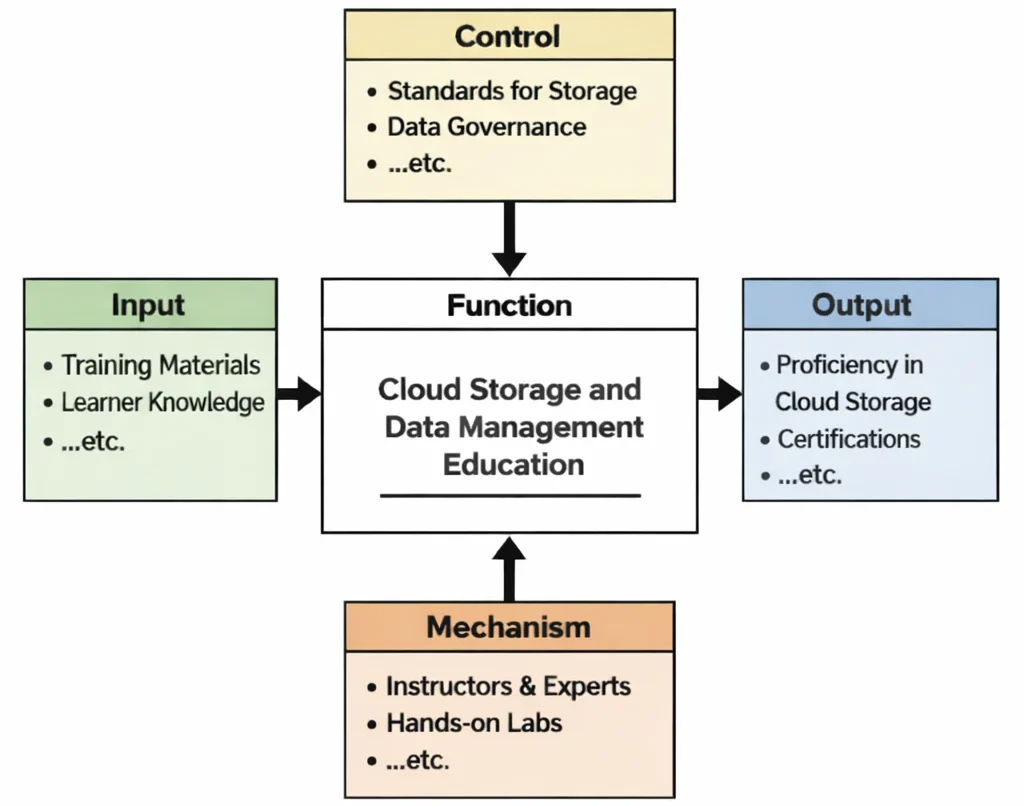
Cloud Storage – Review Questions and Answers:
1. What is cloud storage and how does it function within modern IT infrastructures?
Answer: Cloud storage is a method of storing digital data on remote servers that can be accessed via the internet, allowing for scalable, secure, and flexible data management. It functions by using distributed systems to store, manage, and back up data across multiple locations, reducing the risk of data loss and improving accessibility. This technology enables organizations to offload the burden of physical storage maintenance while ensuring that data is available on demand. Cloud storage also facilitates collaboration and data sharing across geographically dispersed teams.
2. What are the primary types of cloud storage services available today?
Answer: The primary types of cloud storage services include object storage, block storage, and file storage, each designed to meet different data management needs. Object storage is ideal for storing large volumes of unstructured data such as multimedia files, while block storage offers high performance for transactional databases and applications that require low latency. File storage, on the other hand, provides a shared file system accessible by multiple users simultaneously. Each type is optimized for specific workloads, allowing organizations to select the most appropriate solution for their requirements.
3. How does cloud storage enhance data security and reliability compared to traditional storage solutions?
Answer: Cloud storage enhances data security and reliability by utilizing advanced encryption techniques, redundancy, and automated backup systems that safeguard data against loss and unauthorized access. It employs multiple data centers and replication strategies to ensure that data is continuously available even if one location experiences issues. The built-in disaster recovery features help minimize downtime and protect against data corruption. Furthermore, continuous monitoring and regular security updates from cloud providers add an extra layer of protection that traditional storage methods often lack.
4. What role does data redundancy play in cloud storage systems?
Answer: Data redundancy in cloud storage systems involves creating multiple copies of data across different servers or geographic locations to ensure that no single point of failure can result in data loss. This redundancy enhances data durability and reliability by allowing quick recovery in case of hardware failures or natural disasters. It is a critical component for maintaining high availability and ensuring business continuity. By distributing data across various nodes, cloud storage systems provide robust protection against data loss while also optimizing load balancing and performance.
5. How do cloud storage solutions support scalability and cost efficiency for growing businesses?
Answer: Cloud storage solutions support scalability by allowing businesses to dynamically increase or decrease storage capacity based on current demand without the need for significant upfront capital investments. This pay-as-you-go pricing model ensures that companies only pay for the storage they use, leading to cost efficiency. Additionally, the scalability of cloud storage enables seamless expansion to accommodate growth in data volume without disruption. These features provide businesses with the flexibility to manage storage resources efficiently as their data needs evolve.
6. What are the key considerations for choosing a cloud storage provider?
Answer: Key considerations for choosing a cloud storage provider include evaluating security measures, compliance with regulatory standards, scalability, performance, and cost-effectiveness. Organizations must assess the provider’s data encryption, redundancy practices, and disaster recovery capabilities to ensure that sensitive data is well-protected. They should also consider service-level agreements (SLAs) and customer support, as well as the provider’s ability to integrate with existing IT systems. Making an informed choice requires balancing technical requirements with budgetary constraints and future growth plans.
7. How does cloud storage facilitate disaster recovery and business continuity?
Answer: Cloud storage facilitates disaster recovery and business continuity by maintaining multiple copies of data across geographically dispersed data centers. In the event of a disaster or system failure, the distributed nature of cloud storage allows for rapid data restoration from backup sites. This minimizes downtime and ensures that critical business operations can resume with minimal disruption. The automated backup and replication features inherent in cloud storage systems further enhance the reliability of disaster recovery processes.
8. In what ways does cloud storage contribute to collaboration and remote work?
Answer: Cloud storage contributes to collaboration and remote work by enabling users to access, share, and update files from any location with an internet connection. It supports real-time collaboration through centralized data repositories that multiple users can access simultaneously, enhancing team productivity and reducing version control issues. The ease of file sharing and the integration with various collaboration tools streamline communication and workflow across dispersed teams. This flexibility supports a modern, mobile workforce that requires constant connectivity and access to up-to-date information.
9. What challenges might organizations face when migrating to cloud storage, and how can these challenges be addressed?
Answer: Organizations may face challenges such as data migration complexities, potential downtime, integration issues with legacy systems, and concerns over data security and compliance. Addressing these challenges involves careful planning, including a thorough assessment of current data environments and clear migration strategies. Implementing robust encryption, access controls, and regular testing during the transition can mitigate security risks. Additionally, choosing a reputable cloud storage provider with strong support and comprehensive migration tools can significantly ease the transition process.
10. How do evolving technologies and trends impact the future of cloud storage solutions?
Answer: Evolving technologies such as artificial intelligence, edge computing, and blockchain are set to revolutionize cloud storage solutions by enhancing automation, data security, and processing efficiency. These advancements will enable smarter data management, real-time analytics, and more secure, decentralized storage infrastructures. Trends like the increasing demand for green data centers and improved data governance will further shape the evolution of cloud storage. As these technologies mature, they will drive innovation, lower operational costs, and provide more robust, scalable storage options for businesses of all sizes.
Cloud Storage – Thought-Provoking Questions and Answers
1. How can advancements in AI transform data management strategies within cloud storage environments?
Answer: AI advancements can revolutionize data management in cloud storage by automating data organization, enhancing predictive analytics, and optimizing storage utilization. Machine learning algorithms can analyze large datasets to identify usage patterns, predict future storage needs, and automate tiered storage strategies, ensuring that data is stored in the most cost-effective and efficient manner. This integration enables proactive management of storage resources, reduces waste, and improves overall system performance.
Furthermore, AI-driven analytics can help in detecting anomalies, preventing data breaches, and ensuring compliance with regulatory requirements. These capabilities allow organizations to make informed decisions about data retention and deletion, ultimately streamlining the entire storage lifecycle. As a result, businesses can achieve higher levels of operational efficiency and a more agile response to evolving data demands.
2. What are the potential risks and benefits of integrating blockchain technology with cloud storage solutions?
Answer: Integrating blockchain technology with cloud storage solutions can offer enhanced security and transparency by providing an immutable ledger for data transactions. This integration can improve data integrity, facilitate secure sharing, and ensure that data modifications are verifiable and auditable. The decentralized nature of blockchain helps mitigate risks associated with data tampering and unauthorized access, thereby increasing trust in cloud storage systems.
However, this integration also presents challenges, including increased complexity, potential performance overhead, and scalability issues. Organizations must balance the benefits of enhanced security with the technical hurdles of implementing blockchain protocols. Careful planning, research, and collaboration with experts are essential to harness the full potential of blockchain in cloud storage while mitigating its drawbacks.
3. In what ways can cloud storage solutions be optimized to reduce energy consumption and support sustainable IT practices?
Answer: Cloud storage solutions can be optimized for energy efficiency by utilizing advanced data center technologies, virtualization, and dynamic resource allocation. Modern data centers leverage energy-efficient hardware, cooling systems, and renewable energy sources to reduce their carbon footprint. By dynamically scaling storage resources based on demand, cloud providers can minimize energy waste during periods of low usage. This approach not only supports sustainable IT practices but also contributes to significant cost savings over time.
In addition, adopting energy-aware algorithms and monitoring systems can help continuously optimize energy consumption. These technologies enable real-time adjustments to cooling and power usage, ensuring that resources are utilized in the most efficient manner possible. By prioritizing sustainability, organizations can align their IT strategies with broader environmental goals and enhance their corporate social responsibility profiles.
4. How might edge computing reshape the traditional cloud storage paradigm in terms of latency and data processing efficiency?
Answer: Edge computing reshapes the traditional cloud storage paradigm by decentralizing data processing and bringing computational resources closer to data sources. This shift significantly reduces latency, as data no longer has to travel long distances to centralized data centers for processing. By processing data at or near the source, edge computing enables real-time analytics and faster response times, which are critical for applications such as IoT and autonomous systems. This transformation leads to more efficient data processing and improved overall performance of cloud storage solutions.
The integration of edge computing with cloud storage also allows for better load balancing and resource allocation. It reduces the strain on central servers and minimizes network congestion, ultimately leading to a more robust and resilient IT infrastructure. As this hybrid model matures, it is expected to drive innovation in application delivery and support the development of new, latency-sensitive services.
5. What impact do regulatory compliance and data sovereignty issues have on the design and implementation of cloud storage architectures?
Answer: Regulatory compliance and data sovereignty issues play a crucial role in shaping cloud storage architectures, as organizations must ensure that their data management practices meet legal and industry-specific standards. These concerns often dictate where and how data is stored, processed, and transferred, leading to the implementation of localized data centers and stringent security protocols. Compliance with regulations such as GDPR or HIPAA requires robust encryption, access control, and regular audits to safeguard sensitive information. These factors directly influence the design of cloud storage solutions, ensuring that they provide both flexibility and security.
In addition, addressing data sovereignty challenges necessitates collaboration between cloud providers and regulatory bodies. Organizations must adopt comprehensive data governance frameworks and continuously monitor regulatory changes to remain compliant. This proactive approach not only mitigates legal risks but also enhances the overall trust and reliability of cloud storage services, enabling businesses to operate confidently in a global market.
6. How can organizations effectively measure the ROI of investing in advanced cloud storage technologies?
Answer: Organizations can measure the ROI of advanced cloud storage technologies by evaluating both tangible and intangible benefits, including cost savings, scalability improvements, and enhanced operational efficiency. Key performance indicators (KPIs) such as total cost of ownership (TCO), system uptime, data retrieval speeds, and reduction in manual maintenance tasks can provide quantifiable metrics for ROI analysis. By comparing these metrics before and after migration to advanced cloud storage, businesses can assess the financial impact and overall efficiency gains. A comprehensive ROI evaluation also considers the strategic benefits of improved data security and enhanced disaster recovery capabilities.
Beyond direct financial metrics, organizations should also consider the impact on innovation and competitive advantage. Improved scalability and performance enable faster product development and better customer service, which contribute to long-term growth and market share. Regular reviews and benchmarking against industry standards further ensure that investments in cloud storage technologies continue to deliver measurable value over time.
7. What future trends in data storage technologies could significantly alter the cloud storage landscape?
Answer: Future trends in data storage technologies, such as the adoption of non-volatile memory express (NVMe), software-defined storage, and advancements in quantum storage, are set to revolutionize the cloud storage landscape. These technologies promise to dramatically increase data transfer speeds, reduce latency, and improve overall storage efficiency. As innovations continue to emerge, cloud storage solutions will become more robust and capable of handling exponentially growing data volumes. This evolution will drive new use cases and applications, ultimately transforming how data is stored, accessed, and managed.
Additionally, the integration of AI and machine learning for predictive analytics and automated storage management will further enhance performance and cost efficiency. These trends will enable more dynamic and responsive cloud storage architectures that are better equipped to meet the demands of the digital era. As a result, organizations can expect significant improvements in scalability, security, and operational efficiency in the coming years.
8. How can cloud storage providers ensure a balance between performance, cost, and security in their offerings?
Answer: Cloud storage providers can ensure a balance between performance, cost, and security by adopting a multi-tiered storage architecture that aligns different service levels with customer needs. By offering a range of storage options—from high-performance, low-latency solutions to cost-effective, archival storage—providers can tailor their services to diverse use cases. Implementing robust encryption, automated backup, and disaster recovery solutions helps maintain security without compromising performance. Additionally, the use of dynamic pricing models and resource allocation algorithms allows providers to optimize costs while delivering reliable performance.
Providers must continuously monitor service quality through SLAs and customer feedback, adjusting their strategies to meet evolving market demands. Investing in advanced technologies and infrastructure upgrades also plays a critical role in achieving this balance. Ultimately, a customer-centric approach that prioritizes flexibility and innovation ensures that cloud storage offerings remain competitive and effective in addressing the complex needs of modern enterprises.
9. How might advancements in data compression and deduplication impact cloud storage efficiency and cost savings?
Answer: Advancements in data compression and deduplication technologies can significantly enhance cloud storage efficiency by reducing the overall data footprint and minimizing redundant storage. These techniques compress data to occupy less space and eliminate duplicate copies, leading to lower storage costs and improved utilization of resources. Enhanced efficiency not only translates to cost savings for both providers and customers but also reduces energy consumption and supports sustainable IT practices. The overall impact is a more streamlined storage environment that can handle larger data volumes without a proportional increase in costs.
Furthermore, improved data compression and deduplication enable faster data transfers and quicker backup and recovery processes. This acceleration in data management operations contributes to higher system performance and increased user satisfaction. As these technologies continue to evolve, they will become integral to the optimization strategies of cloud storage providers, driving further innovations in data management and cost efficiency.
10. What strategies can organizations implement to mitigate the risks associated with cloud storage data breaches?
Answer: Organizations can mitigate the risks associated with cloud storage data breaches by implementing a comprehensive security framework that includes strong encryption, multi-factor authentication, and regular security audits. Establishing robust access controls and monitoring user activities are critical steps in preventing unauthorized access to sensitive data. Additionally, employing automated threat detection systems and incident response protocols helps to quickly identify and neutralize potential breaches. Regular employee training on cybersecurity best practices further reinforces the organization’s overall security posture.
Investing in advanced security technologies and partnering with reputable cloud storage providers also plays a vital role in risk mitigation. By continuously updating security measures to address emerging threats, organizations can maintain a proactive defense against data breaches. This multifaceted approach not only protects valuable data but also builds trust with customers and stakeholders, ensuring long-term operational resilience.
11. How can the integration of cloud storage with other digital transformation initiatives drive overall business growth?
Answer: The integration of cloud storage with broader digital transformation initiatives drives business growth by enabling seamless data access, improved collaboration, and enhanced operational agility. As organizations modernize their IT infrastructure, cloud storage provides the foundation for scalable data management and real-time analytics, which are critical for making informed decisions. This integration facilitates faster innovation cycles, supports remote work, and improves customer experiences by ensuring that data is always accessible and secure. Ultimately, cloud storage becomes a key enabler of digital transformation, driving efficiencies and unlocking new revenue opportunities.
Moreover, the convergence of cloud storage with emerging technologies such as AI, IoT, and big data analytics amplifies its impact on business growth. By leveraging integrated solutions, organizations can harness insights from vast amounts of data to optimize processes and create innovative products and services. This synergy not only streamlines operations but also positions companies to better respond to market trends and maintain a competitive edge.
12. What long-term economic and operational impacts can organizations expect from adopting advanced cloud storage technologies?
Answer: Adopting advanced cloud storage technologies can yield substantial long-term economic benefits through cost savings, improved operational efficiency, and enhanced scalability. By reducing capital expenditures and shifting to an operational expenditure model, organizations can reallocate resources toward strategic growth initiatives. The improved performance and reliability of advanced cloud storage systems also contribute to higher productivity and reduced downtime, translating to significant financial gains over time. These impacts collectively drive a more agile and resilient business model that is well-suited for the digital economy.
On an operational level, advanced cloud storage technologies enable faster data access, better disaster recovery, and seamless integration with other IT systems. This results in streamlined workflows and more robust data governance practices that support long-term business continuity. As a result, companies are better positioned to innovate, respond to market changes, and maintain competitive advantage in an increasingly data-driven world.
Cloud Storage – Numerical Problems and Solutions
1. Calculating Monthly Cloud Storage Cost
Solution:
Step 1: Assume the cost per GB is $0.03 and an organization stores 50 TB (50,000 GB) of data.
Step 2: Compute the monthly cost: 50,000 GB × $0.03 = $1,500.
Step 3: Verify by calculating the annual cost: $1,500 × 12 = $18,000.
2. Estimating Annual Savings from Migrating to Cloud Storage
Solution:
Step 1: Suppose on-premise storage costs $0.10 per GB per month and cloud storage costs $0.03 per GB per month for 30 TB (30,000 GB).
Step 2: Calculate monthly cost difference: (0.10 – 0.03) × 30,000 = $2,100.
Step 3: Annual savings: $2,100 × 12 = $25,200.
3. Determining Cost Per File Stored in the Cloud
Solution:
Step 1: If the monthly cloud storage cost is $1,200 and there are 400,000 files stored, calculate cost per file: $1,200 ÷ 400,000 = $0.003 per file.
Step 2: Multiply by the total number of files for verification if needed.
Step 3: Confirm that the cost per file remains $0.003.
4. Calculating Data Redundancy Overhead
Solution:
Step 1: Assume a redundancy factor of 3 (data is stored in 3 copies) and raw data size is 20 TB.
Step 2: Calculate effective storage needed: 20 TB × 3 = 60 TB.
Step 3: If cost per TB is $50, then total cost: 60 TB × $50 = $3,000.
5. Estimating Data Transfer Cost for Cloud Storage Backup
Solution:
Step 1: Suppose data transfer cost is $0.05 per GB and 8 TB (8,192 GB) of data is backed up monthly.
Step 2: Calculate base cost: 8,192 GB × $0.05 = $409.60.
Step 3: Annual cost: $409.60 × 12 = $4,915.20.
6. Computing Latency Improvement Percentage
Solution:
Step 1: Assume initial latency is 180 ms and new latency is 120 ms after cloud optimization.
Step 2: Determine the reduction: 180 ms – 120 ms = 60 ms.
Step 3: Percentage reduction: (60 ÷ 180) × 100 = 33.33%.
7. Calculating Storage Cost with a Volume Discount
Solution:
Step 1: Base cost is $0.04 per GB for 100 TB (100,000 GB) without discount.
Step 2: Compute initial cost: 100,000 GB × $0.04 = $4,000.
Step 3: With a 20% discount, final cost: $4,000 × 0.80 = $3,200.
8. Determining the ROI of a Cloud Storage Migration Project
Solution:
Step 1: Let the migration cost be $150,000 and the annual operational savings be $50,000.
Step 2: Calculate the payback period: $150,000 ÷ $50,000 = 3 years.
Step 3: For a 5-year period, total savings = $50,000 × 5 = $250,000; ROI = (($250,000 – $150,000) ÷ $150,000) × 100 = 66.67%.
9. Computing the Cost Per TB for Cloud Storage
Solution:
Step 1: Assume monthly cost for 200 TB is $10,000.
Step 2: Calculate cost per TB: $10,000 ÷ 200 = $50 per TB per month.
Step 3: Annual cost per TB: $50 × 12 = $600 per TB.
10. Calculating the Effect of Data Compression on Storage Costs
Solution:
Step 1: Assume raw data size is 40 TB and compression reduces it by 50%, resulting in 20 TB.
Step 2: If cost per TB is $75, raw cost: 40 TB × $75 = $3,000; compressed cost: 20 TB × $75 = $1,500.
Step 3: Savings: $3,000 – $1,500 = $1,500, which is a 50% cost reduction.
11. Determining Average Cost per User for Cloud Storage Subscription
Solution:
Step 1: Suppose a cloud storage service costs $8,000 per month and supports 2,000 users.
Step 2: Calculate cost per user: $8,000 ÷ 2,000 = $4 per user per month.
Step 3: Annual cost per user: $4 × 12 = $48 per user.
12. Break-even Analysis for Cloud Storage Investment
Solution:
Step 1: Assume initial investment is $200,000 and monthly savings from cloud storage are $20,000.
Step 2: Calculate payback period: $200,000 ÷ $20,000 = 10 months.
Step 3: Over a 3-year period, total savings = $20,000 × 36 = $720,000, confirming a strong return on investment.